Forums on Intune, SCCM, and Windows 11

Welcome to the forums. Register a free account today to become a member! Once signed in, you'll be able to participate on this site by adding your topics and posts, as well as connect with other members through your own private inbox!

NEW Remote Control stops working on some clients after SCCM upgrade (It happens every time with each upgrade)

  • Thread starter Thread starter WasifAQ
  • Start date Start date
  • Replies Replies 3
  • Views Views 2K

WasifAQ

Member
Messages
19
Solutions
1
Reaction score
1
Points
3
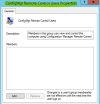
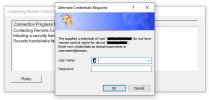
The local group "ConfigMgr Remote Control Users" becomes empty on a few clients. So, we cannot connect with Remote Control to those clients until the local group is populated manually.
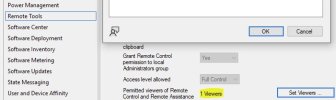
Please note that the relevant client settings are already in place and they were not changed during the upgrade.
 

Attachments

  • Remote Control error.JPG
    Remote Control error.JPG
    39.1 KB · Views: 0
  • ConfigMgr group.JPG
    ConfigMgr group.JPG
    31.7 KB · Views: 1
  • Client Settings for Remote Control.JPG
    Client Settings for Remote Control.JPG
    31.3 KB · Views: 1
  • Registry for Remote Control.JPG
    Registry for Remote Control.JPG
    46.9 KB · Views: 1
Is you client healthy? have you reviewed the logs? have you reviewed the Event viewer?
 
Is you client healthy? have you reviewed the logs? have you reviewed the Event viewer?
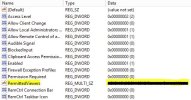
The client is healthy, in the sense that it is showing a green icon in the console, it is getting new policies and deployments. The clients settings are reflecting correctly in the registry.
 
The client is healthy, in the sense that it is showing a green icon in the console, it is getting new policies and deployments. The clients settings are reflecting correctly in the registry.
Have you reviewed the logs? Do they see the policy?
 
Back
Top