Forums on Intune, SCCM, and Windows 11

Welcome to the forums. Register a free account today to become a member! Once signed in, you'll be able to participate on this site by adding your topics and posts, as well as connect with other members through your own private inbox!

SOLVED Random folders created in D drive

Status
Not open for further replies.
Messages
8
Reaction score
1
Points
3
Dear Team,

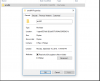
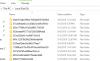
Random folders are created with single sub folder amd64 in D drive in many of my Clint PC within the domain after SCCM agent installed.
Please try to solve this issue.
 

Attachments

  • amd64.PNG
    amd64.PNG
    5.3 KB · Views: 4
  • Random Folder.PNG
    Random Folder.PNG
    25.2 KB · Views: 4
Can you check what's inside those folders ?. It might be the case the someone would have imported the drivers or some sort of files within D drive.
 
These folders are created by Software Update and it is the SU they are not cleaning up after themselves. There isn't a lot that you can do about them but deleted them. BUT make sure that you have rebooted the computer after you have applied the SU.
 
Status
Not open for further replies.

Forum statistics

Threads
7,159
Messages
27,948
Members
18,242
Latest member
amcnear

Latest posts

Trending content

Back
Top