Forums on Intune, SCCM, and Windows 11

Welcome to the forums. Register a free account today to become a member! Once signed in, you'll be able to participate on this site by adding your topics and posts, as well as connect with other members through your own private inbox!

SOLVED Question about sync between All Software Updates and Devices.

  • Thread starter Thread starter petitsuise
  • Start date Start date
  • Replies Replies 5
  • Views Views 4K
Status
Not open for further replies.

petitsuise

New Member
Messages
3
Reaction score
1
Points
3
Hello!sccm.png
First of all, thanks for reading my thread. I have a question about the sync between the software updates that appears in software library.

It's possible get down the time between appears the new update (for example) the new security intelligence update and the devices that are required?

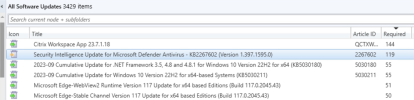
Because, I have 300+ device and always I have a time lapse between some devices are connecting and new updates appear. There are some option in client settings or similar? I attach an example picture, I have 240 devices online but only recognices that the update needs 119.

Regards
 
Solution
but i got down Software update scan schedule like WasifAQ posted from default (1 hour) to 15 minutes, and, right now, is working fine and 85%-90% devices already updated with last definition update deployed by Microsoft.
Less than an 4 hours is bad as it might cause more problems than it solves. MS only supports WSUS checking for updates every 8 hours soo... The default is 7 days for all scans.

So all of this is becareful that you are not causing yourself more headaches.
You can run "Evaluate Software Updates Deployment" so it will start scanning the online computers immediately.
OR
You can configure the "Software update scan schedule" in the "Client Settings" to match with the Software Update Point sync schedule to start scanning every time after a sync
 
Hello!View attachment 5617
First of all, thanks for reading my thread. I have a question about the sync between the software updates that appears in software library.

It's possible get down the time between appears the new update (for example) the new security intelligence update and the devices that are required?

Because, I have 300+ device and always I have a time lapse between some devices are connecting and new updates appear. There are some option in client settings or similar? I attach an example picture, I have 240 devices online but only recognices that the update needs 119.

Regards
Keep in mind that SU is supersede already, As shown by the yellow icon. Clients are likely reporting the new version. There is always be a delay but if you setup your ADRs then this shouldn't be a problem.
 
Hello!

Thank you very much for your replies! Garth, you're right, the update was already superseed and wasn't a valid example, but i got down Software update scan schedule like WasifAQ posted from default (1 hour) to 15 minutes, and, right now, is working fine and 85%-90% devices already updated with last definition update deployed by Microsoft.

My ADR is configured by the moment for only searching with Date Released or revised the Last 1 day, and it's working fine.

Best regards.
 
but i got down Software update scan schedule like WasifAQ posted from default (1 hour) to 15 minutes, and, right now, is working fine and 85%-90% devices already updated with last definition update deployed by Microsoft.
Less than an 4 hours is bad as it might cause more problems than it solves. MS only supports WSUS checking for updates every 8 hours soo... The default is 7 days for all scans.

So all of this is becareful that you are not causing yourself more headaches.
 
Solution
Status
Not open for further replies.
Back
Top