Forums on Intune, SCCM, and Windows 11

Welcome to the forums. Register a free account today to become a member! Once signed in, you'll be able to participate on this site by adding your topics and posts, as well as connect with other members through your own private inbox!

SOLVED Query to disable explorer proxy setting on users computers

Status
Not open for further replies.

PASCAL JOURDAN

Well-Known Member
Messages
120
Solutions
3
Reaction score
2
Points
18
Hi,

I have a park of 450 pc, and I have to make the removal of proxy settings from all browsers internet explorer 11 and 12. We have nw established internet connections via a new firewall and have to remove all these settings
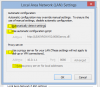
There is a method to set all parameters of lan settings on these browsers on yellow color in attached document to zero.
Can A query make this change?
Best looks
pascal
 

Attachments

  • Capture.PNG
    Capture.PNG
    15 KB · Views: 7
Hi PASCAL JOURDAN,

You can do this with GPO as with SCCM.
Just choose one client and check her Windows Registry:

Open "regedit", navigate to HKCU\software\Microsoft\Windows\CurrentVersion\Internet Settings
In the right panel, you have the proxy settings.​

Now, you can define the registry keys what you need to change, then you create a GPO or a SCCM package and deploy it on you clients.
 
Hi,

I have a park of 450 pc, and I have to make the removal of proxy settings from all browsers internet explorer 11 and 12. We have nw established internet connections via a new firewall and have to remove all these settings
There is a method to set all parameters of lan settings on these browsers on yellow color in attached document to zero.
Can A query make this change?
Best looks
pascal
I would suggest to make use of GPO instead of SCCM to achieve this task.
 
I would suggest to make use of GPO instead of SCCM to achieve this task.

Hi Prajwal,

Tks for your prompt answer , i ll try to do this by GPO , because this seems more suitable for this task, thank you for your response and your speed.
Best regards

Pascal
 
Hi PASCAL JOURDAN,

You can do this with GPO as with SCCM.
Just choose one client and check her Windows Registry:

Open "regedit", navigate to HKCU\software\Microsoft\Windows\CurrentVersion\Internet Settings
In the right panel, you have the proxy settings.​

Now, you can define the registry keys what you need to change, then you create a GPO or a SCCM package and deploy it on you clients.

hi Youssef,
I ll try to test this on a new package and test if it will be more efficient to do this methode or applied GPO , thank you sincerely for your reply
Best regards
Pascal
 
Status
Not open for further replies.
Back
Top