Forums on Intune, SCCM, and Windows 11

Welcome to the forums. Register a free account today to become a member! Once signed in, you'll be able to participate on this site by adding your topics and posts, as well as connect with other members through your own private inbox!

SOLVED PXE not working

  • Thread starter Thread starter CrisKolkman
  • Start date Start date
  • Replies Replies 3
  • Views Views 11K

CrisKolkman

Active Member
Messages
26
Solutions
2
Reaction score
0
Points
1
Hello,

I'm trying to setup an extra DP to serve PXE clients, this is on a different VLAN.
We have our main SCCM server on our server VLAN (let's say VLAN10), we are adding the new DP on our install VLAN (let's say VLAN20).
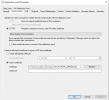
The PXE is configured like this:
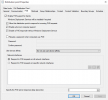
1633153976124.png
For testing purposes the DP in VLAN20 is also the DHCP server (with option 60 enabled).
We can't get it to work and in the SMSPXE.log we see below errors:

1633154142956.png

In an attempt to solve the "No Management Points" I also installed the Management Point role on the DP, but this doesn't help as well.

On the PXE client we see:

1633154485774.png

The SCCM environment is set to "HTTPS Only".

Anyone an idea of where I should look or what I've done wrong?
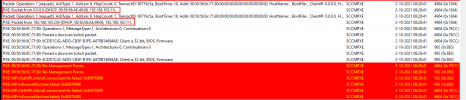
 
A bit more information.
When we work like we want to (DHCP on a server in our server VLAN (VLAN10)) we have 2 IP helpers on our firewall for VLAN20 (one for the DHCP server and one for the DP 192.168.103.11) and see below in SMSPXE.log:
1633156566979.png
Seems like the above output shows 2 request coming from IP 0.0.0.0 and IP 192.168.103.254 (default gateway for VLAN30).

When I remove the IP helper for the DP (since it's on the same VLAN as the PXE clients), I see below in SMSPXE.log:
1633156813190.png

In both cases the PXE client shows:
1633156873847.png

Edit: The above PXE client error is also shown when we are using PXE with WDS.
 
Last edited:
Upon further investigating the PXE DP in VLAN20, I found below values in the registry (path: HKEY_LOCAL_MACHINE\SOFTWARE\Microsoft\SMS\DP):
ManagementPoints - Value EMPTY
MPPort - Value 80

I wonder why this info is not correct, I changed the values (on the PXE DP) to below and restarted the PXE service:
ManagementPoints - PXESERVER_VLAN20*SCCMSERVER*VLAN10
MPPort - 443
1633162068405.png

Which seems to solve the No Management Points error and make PXE do a bit more, but now showing this error in SMSPXE.log:
1633162355592.png
Why the message Not in SSL? And is this causing the message "Unsuccessful in getting MP key information"?

Checking the same registry values on the main SCCM server, shows the same empty value and 80 value as I found on the PXE DP (I did not change them on the main SCCM server):
1633162573712.png
 
Okay so since we have SCCM set to HTTPS Only, I had to import our Workstation PKI into the distribution point:
1633166259185.png

This makes the machine start the deployment now!

Still wondering why the ManagementPoints registry value in the PXE DP was empty, I think when I revert that value back to empty I will get the error No Management Points again...
 

Forum statistics

Threads
7,165
Messages
27,971
Members
18,271
Latest member
prashantrm

Trending content

Back
Top