Forums on Intune, SCCM, and Windows 11

Welcome to the forums. Register a free account today to become a member! Once signed in, you'll be able to participate on this site by adding your topics and posts, as well as connect with other members through your own private inbox!

PENDING PXE-E55: ProxyDHCP service did not reply to request on port 4011

  • Thread starter Thread starter MedHajjem
  • Start date Start date
  • Replies Replies 19
  • Views Views 6K

MedHajjem

Member
Messages
19
Solutions
2
Reaction score
0
Points
1
hello
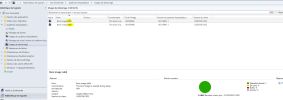
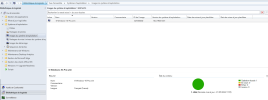
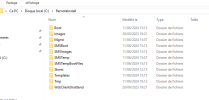
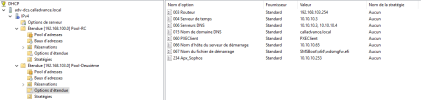
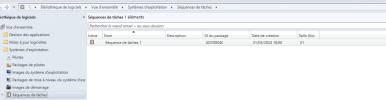
following the preparation of the system deployment with scp 2309, I installed and configured the wds role for pxe, add a wim image with the latest ISO of windows 10 2202 H2, distribute the contents,in the dcp part, I added the options (60,66 and 67 ) .now when I test the boot in a machine by F12 it does not pass
attached are screenshots of the configuration
Cordially
 

Attachments

  • séquence task.PNG
    séquence task.PNG
    45 KB · Views: 7
  • boot os.PNG
    boot os.PNG
    99 KB · Views: 7
  • OS Image.PNG
    OS Image.PNG
    103 KB · Views: 9
  • remote install.PNG
    remote install.PNG
    46.4 KB · Views: 11
  • DHCP.PNG
    DHCP.PNG
    39.5 KB · Views: 10
Solution
hi,
I have installed a new windows 2019 server and I have mounted the WDS role, after changing the IP in dhcp of the new WDS, I have succeeded in booting to the WDS server from a workstation.
Cordially;
hi,
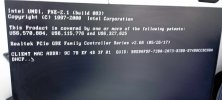
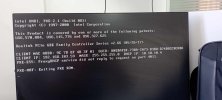
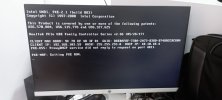
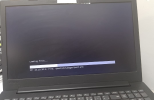
please find attached the screenshots displayed when I click on F12
Cordially;
 

Attachments

  • b9674e2f-4c47-46a1-ba4d-0113dfc59965.jpg
    b9674e2f-4c47-46a1-ba4d-0113dfc59965.jpg
    75.5 KB · Views: 11
  • 2dabcce1-d65a-487c-8a80-4ea6d63f935f.jpg
    2dabcce1-d65a-487c-8a80-4ea6d63f935f.jpg
    79.6 KB · Views: 11
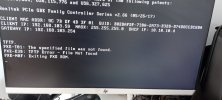
From the screenshot that you attached, I see you are experiencing the following error: PXE-E55: ProxyDHCP service did not reply to request on port 4011

Solution: In order for a PXE server to reply to a PXE request, the request needs to be able to communicate with PXE servers on other subnets by traversing routers. PXE transfers data using the DHCP option fields.

In order for the PXE server to react appropriately, it is helpful to ensure that DHCP packets are routed to it by including the PXE server in the router's IP assistance table.

The PXE-E55 error message suggests that the PXE client attempted to connect to the proxyDHCP server on port 4011 but was unable to establish a connection. When the DHCP server has the DHCP Class Identifier Option 60 configured, but the proxyDHCP service is not operating on port 4011 on the same system, an issue may arise.

To fix this, In the DHCP setup, do not set the DHCP Class Identifier Option 60 if you are running DHCP and proxyDHCP services on separate machines. Permit services to operate on UDP port 67 (bootps). In the DHCP settings, specify the DHCP Class Identifier Option 60 if you are running both DHCP and proxyDHCP services on the same computer. Allow the proxyDHCP service to operate on port 4011 (UDP) and the DHCP service to operate on port 67 (UDP).
 
Hi Prajwal,
for the dhcp proxy, do I need to add a new option in the DHCP settings or just a service to allow in the dhcp server and SCCM?

Cordially
 
Hello,

When I activate the 060 PXE CLient in the extension , I receive the message from port 4011
Cordially
 

Attachments

  • pb port 4011.jpeg
    pb port 4011.jpeg
    77.9 KB · Views: 4
You must contact your network team for this. Basically the DHCP is not forwarding the request to PXE server. If that is not the case, repair the PXE once.
 
hi,
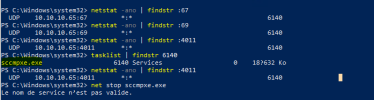
I've noticed that the WDS service is not running on the SCCM server. Is this normal?
 

Attachments

  • wds down.PNG
    wds down.PNG
    9.3 KB · Views: 6
Hi Prajwal,
I notice that sccmpxe also uses the same ports 67,69 and 4011 as WDS, so since these ports are reserved by SCCMPXE, WDS can't stay running.
 

Attachments

  • conflict wds sccmpxe.PNG
    conflict wds sccmpxe.PNG
    14.2 KB · Views: 4
hi,
I have installed a new windows 2019 server and I have mounted the WDS role, after changing the IP in dhcp of the new WDS, I have succeeded in booting to the WDS server from a workstation.
Cordially;
 

Attachments

  • boot wds.PNG
    boot wds.PNG
    478.1 KB · Views: 2
Solution
hello,
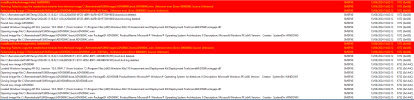
please find attached the captures of the detected errors

Cordially
 

Attachments

  • error smspxe1.PNG
    error smspxe1.PNG
    55.3 KB · Views: 6
  • error SMSPXE.PNG
    error SMSPXE.PNG
    89.4 KB · Views: 6
hello
Comment puis-je réparer le PXE dans sccm, j'ai activé l'option de répondeur PXE, ma version actuelle de SCCM est 2309


Cordially
 
Hello,
I'm really sorry,
how can I fix the PXE in sccm ?
i have enabled the PXE responder otion
my current version SCCM is 2309

Thanks
 
hello Prajwal,
To isolate the source of my blocage , i installed separately in a new windows server 2019 the wds server , i changed in the DHCP extents the IP of the startup server by the IP of WDS and I succeeded in booting by F12 to this server
So here , i'm reassured that my blocage is at the SCCM level.
I repaired and redistributed the PXE but the problem still persists , I can't boot to the image
please find attached SMSPXE and distmgr logs

Cordially
 

Attachments

Back
Top