Forums on Intune, SCCM, and Windows 11

Welcome to the forums. Register a free account today to become a member! Once signed in, you'll be able to participate on this site by adding your topics and posts, as well as connect with other members through your own private inbox!

SOLVED PXE Booting Failure

Status
Not open for further replies.

MJ-Tech

Well-Known Member
Messages
217
Solutions
25
Reaction score
21
Points
18
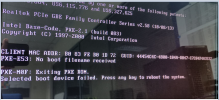
Due to security reasons, we have moved all our servers to a different VLAN, while clients are in another VLAN. There have been no issues with package deployments and patching from SCCM to all endpoints. However, when attempting PXE boot (both legacy and UEFI), I did not receive an IP address from the DHCP server, and there is limited information available in the SMSPXE.log,
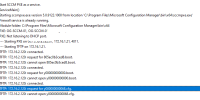
1706877337475.png

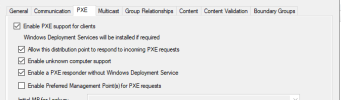
PXE config:

1706877241615.png

We do not have a network expert in our company. From my understanding, there seems to be no handshake between the client and DHCP server, and no communication between DHCP and the SCCM server, likely due to something missing in the VLAN setup. Could you please help me understand the prerequisites needed to troubleshoot and resolve this issue? Do we have any workarounds available to make it functional for now?

 
Solution
In our environment we have both options configured although there are others that may only have 66.

option 66- IP of sccm server
option 67- \smsboot\x64\wdsmgfw.efi

If the new vlan where machines would be handed an IP is 10.200. for example, I would suggest that you look at that range's scope options if it is different than what was previously configured (lets say it was also 172.1) and mimic the options from the previous one.

this is all assuming that if you connect an existing working machine, an ip address is handed so there are no other larger network issues.
With the recent network changes did the IP address for your sccm site stay constant? If your scope options are set for options 66/67 in DHCP to a static IP address confirm that this is the same as the site to confirm that pxe offers would still point to the sccm as expected.

Next would be to chekc if the Vlan for computers changed the IP range / addresses in DCHP make sure that these scope options are set accordingly to target the SCCM site.
 
With the recent network changes did the IP address for your sccm site stay constant? If your scope options are set for options 66/67 in DHCP to a static IP address confirm that this is the same as the site to confirm that pxe offers would still point to the sccm as expected.

Next would be to chekc if the Vlan for computers changed the IP range / addresses in DCHP make sure that these scope options are set accordingly to target the SCCM site.
1706881439713.png
No, the IP address has not changed (Server IPs start with 172.x and clients with 10.x). Do we need to set 067 as well? Previously, it was working without this option. If yes, what is the value of 067 for UEFI?

1706882263497.png
 
Last edited:
Due to security reasons, we have moved all our servers to a different VLAN, while clients are in another VLAN. There have been no issues with package deployments and patching from SCCM to all endpoints. However, when attempting PXE boot (both legacy and UEFI), I did not receive an IP address from the DHCP server, and there is limited information available in the SMSPXE.log,
This is not a ConfigMgr issue, if you are not getting IP address. you need to get you network guys to fix this before worrying about PXE.
 
In our environment we have both options configured although there are others that may only have 66.

option 66- IP of sccm server
option 67- \smsboot\x64\wdsmgfw.efi

If the new vlan where machines would be handed an IP is 10.200. for example, I would suggest that you look at that range's scope options if it is different than what was previously configured (lets say it was also 172.1) and mimic the options from the previous one.

this is all assuming that if you connect an existing working machine, an ip address is handed so there are no other larger network issues.
 
Solution
This is not a ConfigMgr issue, if you are not getting IP address. you need to get you network guys to fix this before worrying about PXE.
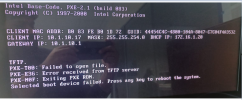
We've resolved the DHCP issue, but it's now showing a TFTP error. Bootable files are located here: C:\Program Files\Microsoft Configuration Manager\bin\X64\SMSBoot\BYN00002\x64. Do we actually need to set option 067?
1706885914680.png
 
Thanks, mikey090tx & Garth, for your suggestions. After setting option 067 to 'SMSBoot\BYN00002\x64\wdsmgfw.efi', PXE started working. However, I've heard that using DHCP options 66 and 67 for SCCM PXE boot is no longer recommended and has been superseded by other methods. If we decide not to set these 2 options, what settings need to be enabled instead?
 
Thanks, mikey090tx & Garth, for your suggestions. After setting option 067 to 'SMSBoot\BYN00002\x64\wdsmgfw.efi', PXE started working. However, I've heard that using DHCP options 66 and 67 for SCCM PXE boot is no longer recommended and has been superseded by other methods. If we decide not to set these 2 options, what settings need to be enabled instead?
Use IP helpers.
 
Status
Not open for further replies.

Forum statistics

Threads
7,136
Messages
27,873
Members
18,159
Latest member
jordysmits
Back
Top