

GhostRiderTGAC
Member
- Messages
- 7
- Solutions
- 1
- Reaction score
- 3
- Points
- 3
Greeting folks... I just completed the update of my Config Manager server to version 2107 and everything seemed to go very well. I used the guide Prajwal posted and updated the server to .NET 4.8 prior to installing and so things went smoothly. Subsequent to the update I also removed Windows ADK and the WinPE and installed Windows ADK for Windows 11 and the WinPE that goes with it. All seemed to go well and I also rebuilt my Config Manager boot images. We use a mix of PXE and SMS boot media in our environment and after rebuilding the boot images, updating the DPs and recreating any SMS boot USB drives, we have a problem.
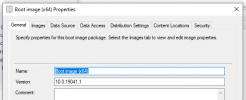
After the update the boot media and PXE all still start the boot process and get to the point where the desktop wallpaper defined originally in the boot images shows up and the normal SMS status window pops up and says "Windows Starting..." and then the boot media crashes and reboots. After doing some research it looks like I might need to add some optional components to the WinPE environment but when I went back into Config Manager and checked the properties of my boot images I am missing tabs. I can no longer see the "Drivers" or "Optional Components" tabs so something is definitely not right. Can anyone give me suggestions on how to correct this? I need to know why these tabs are now missing and how to get them back. Here is what the properties look like currently:
I am concerned that even if I roll the ADK back to the previous version that these missing tabs are going to cause problems. Any assistance would be greatly appreciated.
After the update the boot media and PXE all still start the boot process and get to the point where the desktop wallpaper defined originally in the boot images shows up and the normal SMS status window pops up and says "Windows Starting..." and then the boot media crashes and reboots. After doing some research it looks like I might need to add some optional components to the WinPE environment but when I went back into Config Manager and checked the properties of my boot images I am missing tabs. I can no longer see the "Drivers" or "Optional Components" tabs so something is definitely not right. Can anyone give me suggestions on how to correct this? I need to know why these tabs are now missing and how to get them back. Here is what the properties look like currently:
I am concerned that even if I roll the ADK back to the previous version that these missing tabs are going to cause problems. Any assistance would be greatly appreciated.


