Forums on Intune, SCCM, and Windows 11

Welcome to the forums. Register a free account today to become a member! Once signed in, you'll be able to participate on this site by adding your topics and posts, as well as connect with other members through your own private inbox!

SOLVED Power BI updates are not detected as required

  • Thread starter Thread starter WasifAQ
  • Start date Start date
  • Replies Replies 6
  • Views Views 2K
Status
Not open for further replies.

WasifAQ

Member
Messages
19
Solutions
1
Reaction score
1
Points
3
Power BI is installed on end user computers but the latest update is not getting detected as required.
I have tried running Hardware Inventory cycle and Software Updates Evaluation cycle but the problem still remains.

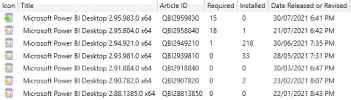
It can be seen clearly in the below pic that 218 machines have 2.94.921.0 so why are they not showing under the "Required" column for newer updates?
Ideally, required should be 218 for both but it is only 18 & 15. What am I missing?
1627905872720.png
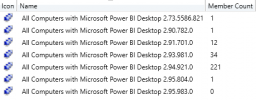
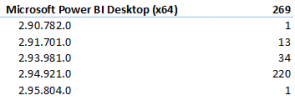
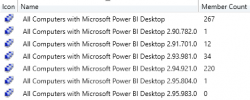
Below is the currently installed versions of Power BI Desktop across the machines, if that helps.
1627907503380.png
Has someone faced a similar problem? Any recommendations are welcome.
p.s. The Power BI updates were published via Ivanti
 

Attachments

  • 1627905712231.png
    1627905712231.png
    4.9 KB · Views: 1
  • 1627907183795.png
    1627907183795.png
    22.3 KB · Views: 1
You will need to look at your collection query to determine how it is being detect (aka ARP vs win app). Then look at the WUA log to if it is being detect, finally look at the detection rules and compare them to your computer.
 
You will need to look at your collection query to determine how it is being detect (aka ARP vs win app). Then look at the WUA log to if it is being detect, finally look at the detection rules and compare them to your computer.
The collection query is based on installed software.
WUA log may not be applicable here because the currently installed apps were installed normally by the EXE setup file and not installed as a software update.
 
The collection query is based on installed software.
WUA log may not be applicable here because the currently installed apps were installed normally by the EXE setup file and not installed as a software update.
Yes WUA would apply still.
 
Finally got it solved by updating .Net Framework.
Apparently .Net Framework 4.8 is required by the latest version of Power BI.
 
Solution
Power BI is installed on end user computers but the latest update is not getting detected as required.
I have tried running Hardware Inventory cycle and Software Updates Evaluation cycle but the problem still remains.

It can be seen clearly in the below pic that 218 machines have 2.94.921.0 so why are they not showing under the "Required" column for newer updates?
Ideally, required should be 218 for both but it is only 18 & 15. What am I missing?

View attachment 3792
Below is the currently installed versions of Power BI Desktop across the machines, if that helps.
View attachment 3794
Has someone faced a similar problem? Any recommendations are welcome.
p.s. The Power BI updates were published via Ivanti
How did you got the Power BI Updates into SCCM? How can I enable them?
I have few clients, where I need to update Power Bi Desktop.
 
How did you got the Power BI Updates into SCCM? How can I enable them?
I have few clients, where I need to update Power Bi Desktop.
There are 3rd party add-ons available in the market. I used the one called Ivanti.
OR
If it is only for 1 app, then you can create an application package every time they release a new version.
 
Status
Not open for further replies.
Back
Top