Forums on Intune, SCCM, and Windows 11

Welcome to the forums. Register a free account today to become a member! Once signed in, you'll be able to participate on this site by adding your topics and posts, as well as connect with other members through your own private inbox!

SOLVED Port connectivity issue between MECM server and client machine.

Status
Not open for further replies.

Vivek Kumar Porwal

Well-Known Member
Messages
54
Reaction score
1
Points
8
Hello,
Hope you all well. I have an issue. In my MECM console, when I am installing the client on the discovered machines, I am getting a question mark on the client machine in MECM console. I checked the ports (80, 443, 10123) and I am shocked. The port connectivity is not established while the MECM server and the client are in the same network. Please help.
 
Hello,
Hope you all well. I have an issue. In my MECM console, when I am installing the client on the discovered machines, I am getting a question mark on the client machine in MECM console. I checked the ports (80, 443, 10123) and I am shocked. The port connectivity is not established while the MECM server and the client are in the same network. Please help.
Why is it not connected? What do the logs say is happening? Exactly what troubleshooting have you done?
 
Hi,
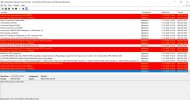
The clients are connected with MECM server and showing active in MECM console, but showing with question mark. I have checked ClientIDManagerStartup.log and sharing the logs with you. I have tried to add the ports in windows firewall, but the state is same.
 

Attachments

  • ClientIDManagerStartup.JPG
    ClientIDManagerStartup.JPG
    197.6 KB · Views: 6
Hi,
The clients are connected with MECM server and showing active in MECM console, but showing with question mark. I have checked ClientIDManagerStartup.log and sharing the logs with you. I have tried to add the ports in windows firewall, but the state is same.
The client registration is successful, based on the screenshot. Can you check the other logs on the client.
 
Hello,

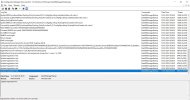
As I have checked the CcmNotificationAgent.log, I am getting the below errors

Successfully queued event on HTTP/HTTPS failure for server 'MECM-SRVR.indiadailytv.in'.
Failed to post Login with error code 87d0027e.
Failed to signin bgb client with error = 87d0027e.
Sleep 3443 seconds to restart client...

I am sending a snap of log for your reference. Please check.
 

Attachments

  • CCMNotificationAgent.JPG
    CCMNotificationAgent.JPG
    195.3 KB · Views: 6
Hello,

As I have checked the CcmNotificationAgent.log, I am getting the below errors

Successfully queued event on HTTP/HTTPS failure for server 'MECM-SRVR.indiadailytv.in'.
Failed to post Login with error code 87d0027e.
Failed to signin bgb client with error = 87d0027e.
Sleep 3443 seconds to restart client...

I am sending a snap of log for your reference. Please check.
87d0027e = Bad HTTP status code
 
Well then it has to be a network issue. time to talk to your networking team.
 
Hello All,

Here an image is attached for your reference. You can see in this image that a question mark is showing on client. But I am able to manage the clients, install the clients, deployment on the clients etc. But not able to remove the question mark on the client in MECM. Please help me to solve this issue. Which logs I need to check?
 

Attachments

  • MECM-Clients.JPG
    MECM-Clients.JPG
    26.7 KB · Views: 5
Also some clients are showing no result on client check result.
Hello All,

Here an image is attached for your reference. You can see in this image that a question mark is showing on client. But I am able to manage the clients, install the clients, deployment on the clients etc. But not able to remove the question mark on the client in MECM. Please help me to solve this issue. Which logs I need to check?
Here is the list of logs and what they are used for. https://learn.microsoft.com/en-us/mem/configmgr/core/plan-design/hierarchy/log-files
 
Status
Not open for further replies.
Back
Top