Hi We are running Autopilot in our environment and running into an issue.
Below is our setup
Intune Tenant: azureadonly.onmicrosoft.com
Federated domain: azuread-only.com (Federates to a passwordless IdP)
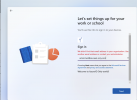
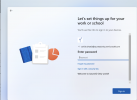
The machine boots up and gets to the custom branded page where the user is asked to login. When the user enters an onmicrosoft.com email address the screen moves to the next screen as presents a password prompt. However, when the user enters the federated domain email address (Domain verified on Azure AAD) the error " We didn't find that email address in your organization. Use another email address or contact your admin". Attached are fiddler traces. The trace shows the machine is trying to connect to intune at onmicrosoft.com tenant. How do we verify the federated domain in Intune like the way we have verified it on Azure. Seems like Intune doesnt recognize users that are on the federated domain.
Below is our setup
Intune Tenant: azureadonly.onmicrosoft.com
Federated domain: azuread-only.com (Federates to a passwordless IdP)
The machine boots up and gets to the custom branded page where the user is asked to login. When the user enters an onmicrosoft.com email address the screen moves to the next screen as presents a password prompt. However, when the user enters the federated domain email address (Domain verified on Azure AAD) the error " We didn't find that email address in your organization. Use another email address or contact your admin". Attached are fiddler traces. The trace shows the machine is trying to connect to intune at onmicrosoft.com tenant. How do we verify the federated domain in Intune like the way we have verified it on Azure. Seems like Intune doesnt recognize users that are on the federated domain.