Hello all,
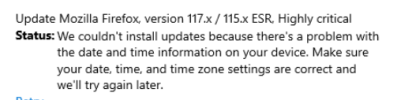
I have updates that are showing up on end user machines in Software Center and/or Windows Update that have been undeployed for months. My updates are automatically undeployed once they exceed 90 days, but these updates are from 120+ days ago. Additionally, these updates are being pushed even though the client machine has the updated version already. There may be a relation here, but a the WSUS cert expired shortly after signing these updates. The certificate has since been renewed and the new cert is bound in IIS manager. These updates are accompanied by an error when downloading/installing stating that the "update cannot be installed due to an issue with the date and time". Any guidance or suggestions that will help to remove these old updates from client machines are welcome.
I have updates that are showing up on end user machines in Software Center and/or Windows Update that have been undeployed for months. My updates are automatically undeployed once they exceed 90 days, but these updates are from 120+ days ago. Additionally, these updates are being pushed even though the client machine has the updated version already. There may be a relation here, but a the WSUS cert expired shortly after signing these updates. The certificate has since been renewed and the new cert is bound in IIS manager. These updates are accompanied by an error when downloading/installing stating that the "update cannot be installed due to an issue with the date and time". Any guidance or suggestions that will help to remove these old updates from client machines are welcome.