Forums on Intune, SCCM, and Windows 11

Welcome to the forums. Register a free account today to become a member! Once signed in, you'll be able to participate on this site by adding your topics and posts, as well as connect with other members through your own private inbox!

PENDING Office 365 Pro Plus deployment from SCCM 2012 R2 SP1

S

sirjeee

Guest
Hi,
I am successfully make an application for office 365 Pro Plus and it will successfully downloading at client side but after downloading installation failed. please guide where i start the troubleshoot. (which log file help me)
Client OS: Windows 7 64 bit, 4 GB RAM and 20 GB free HDD

Error code: The software change returned error code 0x87D01106(-2016407290).
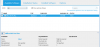
1525318861009.png
 
I am new re-created office 365 application and push it, and also i am attached the AppEnforce.log file please review and guide.
 

Attachments

0x87D01106(-2016407290)
  • Content is not available on Distribution Point
Check if your application has been distributed successfully or not.
 
Dear Prajwal / Youssef Sir,
Office 365 Pro plus installation shown failed in software center but Start window show office 365 pro plus installation done, and word file is successfully opened, please guide how to fixed it. (detection method not work after installation it is not detect the application.


1525351378554.png

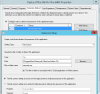
Detection Method Clause
1525406678797.png
 
Dear Sir,
Please close this thread because detection method is working fine after removing the space under path (Office16).

once again thank you very much both of you are very help full.

Thanks
Akhlaq
 

Forum statistics

Threads
7,144
Messages
27,894
Members
18,191
Latest member
escdarck

Trending content

Back
Top