Forums on Intune, SCCM, and Windows 11

Welcome to the forums. Register a free account today to become a member! Once signed in, you'll be able to participate on this site by adding your topics and posts, as well as connect with other members through your own private inbox!

SOLVED Office 365 Current Channel Update for x86 Stuck Downloading at 50% (Looking for a640_exp.cab)

Status
Not open for further replies.

OpenMisere

New Member
Messages
2
Reaction score
0
Points
1
The June 2024 Current Channel Click To Run update on 32bit Office Systems is stuck at 50% downloading on half of my machines.

*Microsoft 365 Apps Update - Current Channel Feature Update for x86 based Edition Version 2406 (Build 17726.20126)

It a similar issue to: https://forums.prajwaldesai.com/threads/problem-updating-office-365-via-sccm-stuck-at-50.5153/
In my case my clients are only using English and my update point already specifies English for the Software Update File and Summary Details.

The ContentTransferManager.log and DataTransferService.log appear to be failing to find the Office\Data\16.0.17726.20126\a640_exp.cab file. The update only contains a file called a320_exp.cab

Comparing x86 to x64, the x64 update references the a640_exp.cab so I'm assuming the my 32bit client should be looking for a320_exp.cab which is in the package contents.

Any way I can correct this?
 
Last edited:

  • Angry
Reactions: msp
Solution
Fyi, Had a long call with Microsoft yesterday. Appears they're aware of the issue with the current channel updates and that the 'product team were working on it' but it didn't sound like there would be a fix until next month. He didn't want to say that the problem I was having with the Monthly update was the same issue.... but it totally is... so he took a bunch of logs and is supposed to get back to me in the next few days. Either way...I wouldn't expect the updates to be revised\fixed until next month.
The June 2024 Current Channel Click To Run update on 32bit Office Systems is stuck at 50% downloading on half of my machines.

*Microsoft 365 Apps Update - Current Channel Feature Update for x86 based Edition Version 2406 (Build 17726.20126)

It a similar issue to: https://forums.prajwaldesai.com/threads/problem-updating-office-365-via-sccm-stuck-at-50.5153/
In my case my clients are only using English and my update point already specifies English for the Software Update File and Summary Details.

The ContentTransferManager.log and DataTransferService.log appear to be failing to find the Office\Data\16.0.17726.20126\a640_exp.cab file. The update only contains a file called a320_exp.cab

Comparing x86 to x64, the x64 update references the a640_exp.cab so I'm assuming the my 32bit client should be looking for a320_exp.cab which is in the package contents.

Any way I can correct this?
Hi,
I have the same problem. Have you found solutions? There is next July MS PT and the problem still exist. I am using O365 with Language cz, en, de. Thanks for help.
 
Hi,
I have the same problem. Have you found solutions? There is next July MS PT and the problem still exist. I am using O365 with Language cz, en, de. Thanks for help.
No I have not unfortunately and was also disappointed to see the next superseding update: Microsoft 365 Apps Update - Current Channel Quality Update for x86 based Edition Version 2406 (Build 17726.20160) has the same issue.

My problem devices are only using flavours of English. Possibly EN-US, EN-UK and EN-AU.

Take a look at this article for adding language support in your ADR language selection.

I have enabled English (United States and English United Kingdom) unfortunately I've been unable to find a link to decipher the language codes and cab file names to be sure this is what it's requesting.

And I'm not sure what "_exp" is referring to.

Are you getting stuck on the same .cab file name?
 
No I have not unfortunately and was also disappointed to see the next superseding update: Microsoft 365 Apps Update - Current Channel Quality Update for x86 based Edition Version 2406 (Build 17726.20160) has the same issue.

My problem devices are only using flavours of English. Possibly EN-US, EN-UK and EN-AU.

Take a look at this article for adding language support in your ADR language selection.

I have enabled English (United States and English United Kingdom) unfortunately I've been unable to find a link to decipher the language codes and cab file names to be sure this is what it's requesting.

And I'm not sure what "_exp" is referring to.

Are you getting stuck on the same .cab file name?
Yes, on the same file look

Datatransfer.log
DTSJob({2C180A60-7170-498F-8D28-CD2EB64A506C}):CDTSJob::HandleErrors - BITS Job '{8A8221E0-6A25-4D6C-8BF7-175D43BE6A40}' under user 'S-1-5-18', OldErrorCount=0, NewErrorCount=1, ErrorCode 0x80190194, ErrorText='BITS error: '0000006063BFDE78' Context: '5

DTSJob({2C180A60-7170-498F-8D28-CD2EB64A506C}):CDTSJob::HandleDownloadError - BITS job {8A8221E0-6A25-4D6C-8BF7-175D43BE6A40} failed to download source file http://szdc000phant135.d01.uadf.cz:...cm?/Office/Data/16.0.17726.20160/a640_exp.cab to destination C:\WINDOWS\ccmcache\d.2C18.dlt\Office\Data\16.0.17726.20160\a640_exp.cab with error 0x80190194

DTSJob({2C180A60-7170-498F-8D28-CD2EB64A506C}):CDTSJob::HandleDownloadError - BITS job {8A8221E0-6A25-4D6C-8BF7-175D43BE6A40} failed to download source file https://szdc000phant135.d01.uadf.cz...cm?/Office/Data/16.0.17726.20160/a640_exp.cab to destination C:\WINDOWS\ccmcache\d.2C18.dlt\Office\Data\16.0.17726.20160\a640_exp.cab with error 0x80190194
 
Yes, on the same file look

Datatransfer.log
DTSJob({2C180A60-7170-498F-8D28-CD2EB64A506C}):CDTSJob::HandleErrors - BITS Job '{8A8221E0-6A25-4D6C-8BF7-175D43BE6A40}' under user 'S-1-5-18', OldErrorCount=0, NewErrorCount=1, ErrorCode 0x80190194, ErrorText='BITS error: '0000006063BFDE78' Context: '5

DTSJob({2C180A60-7170-498F-8D28-CD2EB64A506C}):CDTSJob::HandleDownloadError - BITS job {8A8221E0-6A25-4D6C-8BF7-175D43BE6A40} failed to download source file http://szdc000phant135.d01.uadf.cz:...cm?/Office/Data/16.0.17726.20160/a640_exp.cab to destination C:\WINDOWS\ccmcache\d.2C18.dlt\Office\Data\16.0.17726.20160\a640_exp.cab with error 0x80190194

DTSJob({2C180A60-7170-498F-8D28-CD2EB64A506C}):CDTSJob::HandleDownloadError - BITS job {8A8221E0-6A25-4D6C-8BF7-175D43BE6A40} failed to download source file https://szdc000phant135.d01.uadf.cz...cm?/Office/Data/16.0.17726.20160/a640_exp.cab to destination C:\WINDOWS\ccmcache\d.2C18.dlt\Office\Data\16.0.17726.20160\a640_exp.cab with error 0x80190194
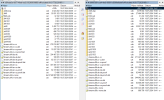
The point is why client need to download a file "a640_exp.cab" from Patch Package which is for x64 O365 but i am using x86 installation source. On the SNAP is the source which download ADR to Primary Source server. I cant validate that on the DP are the same files :-(
1720675982216.png
 
I’ve run into the same issue , same error in data transfer service.log on the same file. Had the same issue with Current channel for the past 2 months but we only had a handful of clients with Current channel so as a workaround deleted the downloaded content from the DPs, then let the clients get the content from Microsoft and it was fine. The majority of our workstations are on Monthly Enterprise, and now this months Monthly update is doing the same thing, again as a workaround we’ve deleted the content from the DPs and set the deployment to get content from Microsoft and machines are patching though this is not ideal.
 
I’ve run into the same issue , same error in data transfer service.log on the same file. Had the same issue with Current channel for the past 2 months but we only had a handful of clients with Current channel so as a workaround deleted the downloaded content from the DPs, then let the clients get the content from Microsoft and it was fine. The majority of our workstations are on Monthly Enterprise, and now this months Monthly update is doing the same thing, again as a workaround we’ve deleted the content from the DPs and set the deployment to get content from Microsoft and machines are patching though this is not ideal.
We=Workstations are behind Proxy and Firewall, Microsoft as Source is not possible...
 
I've had the same issue since June with Office 365 "Monthly Channel" being stuck on 50% downloading on half of my machines. Going into July, I'm having the same problems with my test machines. Has any solution been found yet. Tried adding additional language with no help.
 
Hello everyone,

we are currently running into the same error with all our 365 Office installations.

Our logs look identical to the logs above. It is trying to download the 64-bit update files on an Office 365 32-bit installation for some reason.

It's definitely not the Configuration Manager, we were able to exclude that.
ADR / groups / packages recreated. No success.
Uninstalling and reinstalling Office 365 brings "temporary" success. However, about 2 days later the same problem is present again.

We were able to reproduce this with the registry snapshots.

#### For functional Office 365 installations: ####
[HKEY_LOCAL_MACHINE\SOFTWARE\Microsoft\Office\ClickToRun\Scenario\UPDATE]
"TriggerSource"="COM"
"ComAction"="apply"
"ComActionLastError"="0"
"SourceType"="CDN"
"PipelineInstallPath"="C:\\Program Files (x86)\\Microsoft Office"
"ScenarioSubType"="COM"
"PipelineDownloadPath"="C:\\Program Files (x86)\\Microsoft Office\\Updates\\Download\\PackageFiles\\C0E59231-DE17-4BC1-A9EF-BB78446F10C7"
"ResumeAttempt"="1"
"WorkingConfigurationStatus"="Published"

[HKEY_LOCAL_MACHINE\SOFTWARE\Microsoft\Office\ClickToRun\Scenario\UPDATE\Condition]
"updateapply"="True"
"UpdateApplied"="True"

[HKEY_LOCAL_MACHINE\SOFTWARE\Microsoft\Office\ClickToRun\Updates]
"QueueUpdateParameters"="displaylevel=false triggersource=COM action=apply"

#### For defective Office 365 installations: ####
[HKEY_LOCAL_MACHINE\SOFTWARE\Microsoft\Office\ClickToRun\Scenario\UPDATE]
"TriggerSource"="SCHEDULEDTASK"
"C2RFlighting.UseOfficeHelperAddon"="unknown"
"C2RFlighting.UseOutlookShareAddon"="unknown"
"ComActionLastError"="2"
"SourceType"="CDN"
"PipelineInstallPath"="C:\\Program Files (x86)\\Microsoft Office"
"ScenarioSubType"="Default"

[HKEY_LOCAL_MACHINE\SOFTWARE\Microsoft\Office\ClickToRun\Updates]
"QueueUpdateParameters"="displaylevel=False flt.useofficehelperaddon=unknown flt.useoutlookshareaddon=unknown flt.UseTeamsOnInstallConsumer=unknown flt.UseTeamsOnUpdateConsumer=unknown triggersource=SCHEDULEDTASK"


So far I have not been able to find a solution to the problem.
It is only noticeable that several logouts and restarts of the devices do not overwrite the settings after a new installation, but that this happens "at some point" in time.

Tests:
2303 => 2405/2406
2403 => 2405/2406
2404 => 2405/2406
2405 => 2406
 
Hello everyone,

we are currently running into the same error with all our 365 Office installations.

Our logs look identical to the logs above. It is trying to download the 64-bit update files on an Office 365 32-bit installation for some reason.

It's definitely not the Configuration Manager, we were able to exclude that.
ADR / groups / packages recreated. No success.
Uninstalling and reinstalling Office 365 brings "temporary" success. However, about 2 days later the same problem is present again.

We were able to reproduce this with the registry snapshots.

#### For functional Office 365 installations: ####
[HKEY_LOCAL_MACHINE\SOFTWARE\Microsoft\Office\ClickToRun\Scenario\UPDATE]
"TriggerSource"="COM"
"ComAction"="apply"
"ComActionLastError"="0"
"SourceType"="CDN"
"PipelineInstallPath"="C:\\Program Files (x86)\\Microsoft Office"
"ScenarioSubType"="COM"
"PipelineDownloadPath"="C:\\Program Files (x86)\\Microsoft Office\\Updates\\Download\\PackageFiles\\C0E59231-DE17-4BC1-A9EF-BB78446F10C7"
"ResumeAttempt"="1"
"WorkingConfigurationStatus"="Published"

[HKEY_LOCAL_MACHINE\SOFTWARE\Microsoft\Office\ClickToRun\Scenario\UPDATE\Condition]
"updateapply"="True"
"UpdateApplied"="True"

[HKEY_LOCAL_MACHINE\SOFTWARE\Microsoft\Office\ClickToRun\Updates]
"QueueUpdateParameters"="displaylevel=false triggersource=COM action=apply"

#### For defective Office 365 installations: ####
[HKEY_LOCAL_MACHINE\SOFTWARE\Microsoft\Office\ClickToRun\Scenario\UPDATE]
"TriggerSource"="SCHEDULEDTASK"
"C2RFlighting.UseOfficeHelperAddon"="unknown"
"C2RFlighting.UseOutlookShareAddon"="unknown"
"ComActionLastError"="2"
"SourceType"="CDN"
"PipelineInstallPath"="C:\\Program Files (x86)\\Microsoft Office"
"ScenarioSubType"="Default"

[HKEY_LOCAL_MACHINE\SOFTWARE\Microsoft\Office\ClickToRun\Updates]
"QueueUpdateParameters"="displaylevel=False flt.useofficehelperaddon=unknown flt.useoutlookshareaddon=unknown flt.UseTeamsOnInstallConsumer=unknown flt.UseTeamsOnUpdateConsumer=unknown triggersource=SCHEDULEDTASK"


So far I have not been able to find a solution to the problem.
It is only noticeable that several logouts and restarts of the devices do not overwrite the settings after a new installation, but that this happens "at some point" in time.

Tests:
2303 => 2405/2406
2403 => 2405/2406
2404 => 2405/2406
2405 => 2406
Yes, affected is only 32 bit architecture installator, x64 work good
 
Fyi, Had a long call with Microsoft yesterday. Appears they're aware of the issue with the current channel updates and that the 'product team were working on it' but it didn't sound like there would be a fix until next month. He didn't want to say that the problem I was having with the Monthly update was the same issue.... but it totally is... so he took a bunch of logs and is supposed to get back to me in the next few days. Either way...I wouldn't expect the updates to be revised\fixed until next month.
 
Solution
Fyi, Had a long call with Microsoft yesterday. Appears they're aware of the issue with the current channel updates and that the 'product team were working on it' but it didn't sound like there would be a fix until next month. He didn't want to say that the problem I was having with the Monthly update was the same issue.... but it totally is... so he took a bunch of logs and is supposed to get back to me in the next few days. Either way...I wouldn't expect the updates to be revised\fixed until next month.
Thanks for the update from Microsoft. This has been driving me nuts.
 
Status
Not open for further replies.
Back
Top