Hello,
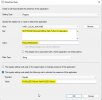
I have a problem to install Office 2021 LTSC on my computers. My current version of the Office on the clients is 2019. I want to superseed by the new version.
I use the unatended xml file for Office 2019 uninstallation:
<Configuration>
<Remove All="TRUE" />
<Product ID="ProPlus2019Volume" >
<Language ID="cs-cz" />
</Product>
<Display Level="None" AcceptEULA="TRUE" />
</Configuration>
and I use xml file with this for Office LTSC installation:
<Configuration ID="aee53572-7f0d-422e-8134-ff8097da9d81">
<Add OfficeClientEdition="64" Channel="PerpetualVL2021">
<Product ID="ProPlus2021Volume" PIDKEY="XXXX-XXXXX-XXXXX-XXXXX-XXXXX">
<Language ID="cs-cz" />
<Language ID="MatchPreviousMSI" />
<ExcludeApp ID="Lync" />
</Product>
</Add>
<Property Name="SharedComputerLicensing" Value="0" />
<Property Name="SCLCacheOverride" Value="0" />
<Property Name="AUTOACTIVATE" Value="0" />
<Property Name="FORCEAPPSHUTDOWN" Value="FALSE" />
<Property Name="DeviceBasedLicensing" Value="0" />
<Updates Enabled="TRUE" />
<RemoveMSI />
<Display Level="None" AcceptEULA="TRUE" />
</Configuration>
I can this error in the AppEnforce.log
+++ Starting Install enforcement for App DT "Microsoft Office LTSC ProfessionalPlus 2021 CZ_4_10_2021" ApplicationDeliveryType - ScopeId_06767197-8CBF-4EAF-964D-EEFAA055FEE2/DeploymentType_7d7ccabd-2268-47c2-8a1a-09bb3788d0d4, Revision - 9, ContentPath - C:\WINDOWS\ccmcache\1z, Execution Context - System AppEnforce 18.10.2021 15:20:56 1840 (0x0730)
Performing detection of app deployment type Microsoft Office LTSC ProfessionalPlus 2021 CZ_4_10_2021(ScopeId_06767197-8CBF-4EAF-964D-EEFAA055FEE2/DeploymentType_7d7ccabd-2268-47c2-8a1a-09bb3788d0d4, revision 9) for system. AppEnforce 18.10.2021 15:20:56 1840 (0x0730)
+++ Application not discovered. [AppDT Id: ScopeId_06767197-8CBF-4EAF-964D-EEFAA055FEE2/DeploymentType_7d7ccabd-2268-47c2-8a1a-09bb3788d0d4, Revision: 9] AppEnforce 18.10.2021 15:20:56 1840 (0x0730)
App enforcement environment:
Context: Machine
Command line: setup.exe /configure .\x64.xml
Allow user interaction: No
UI mode: 0
User token: null
Session Id: 4294967295
Content path: C:\WINDOWS\ccmcache\1z
Working directory: AppEnforce 18.10.2021 15:20:56 1840 (0x0730)
Prepared working directory: C:\WINDOWS\ccmcache\1z AppEnforce 18.10.2021 15:20:56 1840 (0x0730)
Invalid executable file setup.exe AppEnforce 18.10.2021 15:20:56 1840 (0x0730)
CMsiHandler::EnforceApp failed (0x87d01106). AppEnforce 18.10.2021 15:20:56 1840 (0x0730)
AppProvider::EnforceApp - Failed to invoke EnforceApp on Application handler(0x87d01106). AppEnforce 18.10.2021 15:20:56 1840 (0x0730)
CommenceEnforcement failed with error 0x87d01106. AppEnforce 18.10.2021 15:20:56 1840 (0x0730)
Method CommenceEnforcement failed with error code 87D01106 AppEnforce 18.10.2021 15:20:56 1840 (0x0730)
++++++ Failed to enforce app. Error 0x87d01106. ++++++ AppEnforce 18.10.2021 15:20:56 1840 (0x0730)
+++ Starting Uninstall enforcement for App DT "AI_Office2019_23_11_2020" ApplicationDeliveryType - ScopeId_06767197-8CBF-4EAF-964D-EEFAA055FEE2/DeploymentType_4eb3255c-e75c-40dc-ade5-e35c734ee26f, Revision - 8, ContentPath - C:\WINDOWS\ccmcache\21, Execution Context - System AppEnforce 19.10.2021 8:34:34 9112 (0x2398)
I have a problem to install Office 2021 LTSC on my computers. My current version of the Office on the clients is 2019. I want to superseed by the new version.
I use the unatended xml file for Office 2019 uninstallation:
<Configuration>
<Remove All="TRUE" />
<Product ID="ProPlus2019Volume" >
<Language ID="cs-cz" />
</Product>
<Display Level="None" AcceptEULA="TRUE" />
</Configuration>
and I use xml file with this for Office LTSC installation:
<Configuration ID="aee53572-7f0d-422e-8134-ff8097da9d81">
<Add OfficeClientEdition="64" Channel="PerpetualVL2021">
<Product ID="ProPlus2021Volume" PIDKEY="XXXX-XXXXX-XXXXX-XXXXX-XXXXX">
<Language ID="cs-cz" />
<Language ID="MatchPreviousMSI" />
<ExcludeApp ID="Lync" />
</Product>
</Add>
<Property Name="SharedComputerLicensing" Value="0" />
<Property Name="SCLCacheOverride" Value="0" />
<Property Name="AUTOACTIVATE" Value="0" />
<Property Name="FORCEAPPSHUTDOWN" Value="FALSE" />
<Property Name="DeviceBasedLicensing" Value="0" />
<Updates Enabled="TRUE" />
<RemoveMSI />
<Display Level="None" AcceptEULA="TRUE" />
</Configuration>
I can this error in the AppEnforce.log
+++ Starting Install enforcement for App DT "Microsoft Office LTSC ProfessionalPlus 2021 CZ_4_10_2021" ApplicationDeliveryType - ScopeId_06767197-8CBF-4EAF-964D-EEFAA055FEE2/DeploymentType_7d7ccabd-2268-47c2-8a1a-09bb3788d0d4, Revision - 9, ContentPath - C:\WINDOWS\ccmcache\1z, Execution Context - System AppEnforce 18.10.2021 15:20:56 1840 (0x0730)
Performing detection of app deployment type Microsoft Office LTSC ProfessionalPlus 2021 CZ_4_10_2021(ScopeId_06767197-8CBF-4EAF-964D-EEFAA055FEE2/DeploymentType_7d7ccabd-2268-47c2-8a1a-09bb3788d0d4, revision 9) for system. AppEnforce 18.10.2021 15:20:56 1840 (0x0730)
+++ Application not discovered. [AppDT Id: ScopeId_06767197-8CBF-4EAF-964D-EEFAA055FEE2/DeploymentType_7d7ccabd-2268-47c2-8a1a-09bb3788d0d4, Revision: 9] AppEnforce 18.10.2021 15:20:56 1840 (0x0730)
App enforcement environment:
Context: Machine
Command line: setup.exe /configure .\x64.xml
Allow user interaction: No
UI mode: 0
User token: null
Session Id: 4294967295
Content path: C:\WINDOWS\ccmcache\1z
Working directory: AppEnforce 18.10.2021 15:20:56 1840 (0x0730)
Prepared working directory: C:\WINDOWS\ccmcache\1z AppEnforce 18.10.2021 15:20:56 1840 (0x0730)
Invalid executable file setup.exe AppEnforce 18.10.2021 15:20:56 1840 (0x0730)
CMsiHandler::EnforceApp failed (0x87d01106). AppEnforce 18.10.2021 15:20:56 1840 (0x0730)
AppProvider::EnforceApp - Failed to invoke EnforceApp on Application handler(0x87d01106). AppEnforce 18.10.2021 15:20:56 1840 (0x0730)
CommenceEnforcement failed with error 0x87d01106. AppEnforce 18.10.2021 15:20:56 1840 (0x0730)
Method CommenceEnforcement failed with error code 87D01106 AppEnforce 18.10.2021 15:20:56 1840 (0x0730)
++++++ Failed to enforce app. Error 0x87d01106. ++++++ AppEnforce 18.10.2021 15:20:56 1840 (0x0730)
+++ Starting Uninstall enforcement for App DT "AI_Office2019_23_11_2020" ApplicationDeliveryType - ScopeId_06767197-8CBF-4EAF-964D-EEFAA055FEE2/DeploymentType_4eb3255c-e75c-40dc-ade5-e35c734ee26f, Revision - 8, ContentPath - C:\WINDOWS\ccmcache\21, Execution Context - System AppEnforce 19.10.2021 8:34:34 9112 (0x2398)
Attachments
-
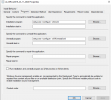 MS Office 2019_1.png29.5 KB · Views: 12
 -
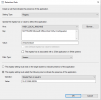 MS Office 2019_2.png27.3 KB · Views: 9
 -
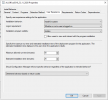 MS Office 2019_3.png28.3 KB · Views: 6
 -
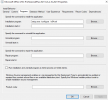 MS Office LTSC Pro Plus 2021_1.png28.1 KB · Views: 13
 -
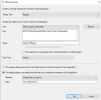 MS Office LTSC Pro Plus 2021_2.png27.4 KB · Views: 12
 -
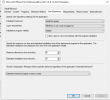 MS Office LTSC Pro Plus 2021_3.png29.1 KB · Views: 11
 -
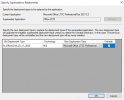 MS Office LTSC Pro Plus 2021_4.png19.6 KB · Views: 13