
I have recently upgraded to SCCM 1606 and ADK 1607.
My old custom boot image still works. It has not been updated by the upgrade process.
I then created a new Boot Image based on ADK 1607. All went well.
However, the F8 key doesn't trigger Command Prompt.
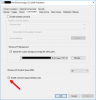
Enable command prompt support is enabled in the Boot Image properties.
I need this to work becuase my Task Sequence is failing with this new Boot Image and I don't really know why.
I would like to examine the smsts.log file.
My old custom boot image still works. It has not been updated by the upgrade process.
I then created a new Boot Image based on ADK 1607. All went well.
However, the F8 key doesn't trigger Command Prompt.
Enable command prompt support is enabled in the Boot Image properties.
I need this to work becuase my Task Sequence is failing with this new Boot Image and I don't really know why.
I would like to examine the smsts.log file.

