
Microsoft Intune 2501 new features are being rolled out to all the customers globally. Microsoft has confirmed that all the tenants should be updated to version 2501. If you are not sure about your tenant version, see how you can check the current service release of your Intune tenant.
With every new monthly service release, Microsoft adds new features to Intune and offers improvements over the previous versions. The features covered in this article are referenced from What’s new in Microsoft Intune documentation by Microsoft.
The two baselines instances (applicable for Windows) include:
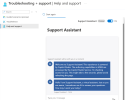
Currently, the Support Assistant is in preview, and you'll have to turn it on manually to use it for the first time. You can enable and disable Support Assistant by choosing to opt in and opt out at any time.
With every new monthly service release, Microsoft adds new features to Intune and offers improvements over the previous versions. The features covered in this article are referenced from What’s new in Microsoft Intune documentation by Microsoft.
What's new in Intune 2501 release
There are two new features added to the Intune 2501 service release, released in the month of January 2025.Security baselines for HoloLens 2
Starting Intune service release 2501, you can now deploy two distinct instances of the security baseline for HoloLens 2. These guidelines represent Microsoft's best practice guidelines and experience in deploying and supporting HoloLens 2 devices to customers across various industries.The two baselines instances (applicable for Windows) include:
- Standard Security Baseline for HoloLens 2
- Advanced Security Baseline for HoloLens 2
Use Support Assistant to resolve issues
The Support Assistant is a new feature that is now available in Intune 2501 release. It leverages AI to enhance your help and support experience, ensuring more efficient issue resolution. You can use the Support Assistant in Microsoft Intune admin center by selecting Troubleshoot + support > Help and Support, or by selecting the question mark near your profile pic.Currently, the Support Assistant is in preview, and you'll have to turn it on manually to use it for the first time. You can enable and disable Support Assistant by choosing to opt in and opt out at any time.

