Hi all,
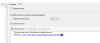
I work at a college and have multiple collection variables assigned to groups within my task sequence mainly to separate departmental software. Lets say that I have one group for "teacher software" and another for say "Design software". If I want to image a teacher machine that is in the design department and deploy all relevant software then I'm thinking that I should be able to add the machine to both of the collections where the variables are set. What seems to be happening in practice is that it hits the first one in the task sequence, processes the steps and then moves on and doesn't attempt to process anymore collection variables. If I swap the order then it still does the first one so both are actually working. I've also created a collection for a specific machine and added the two collection variables to the collection but it's the same outcome. It doesn't want to process more than one.
I've taken a look at the "Status Message Queries" for the machine and also the SMSTS logs but it doesn't show an error. It does show the variables it has skipped because they are not relevant but as soon as it hits the first relevant one, it processes it and doesn't look for anymore. Ideally I'd like to utilise more than one variable so I'm wondering if this is by design or that I'm missing something.
If anyone can shed light on this it would be much appreciated.
I work at a college and have multiple collection variables assigned to groups within my task sequence mainly to separate departmental software. Lets say that I have one group for "teacher software" and another for say "Design software". If I want to image a teacher machine that is in the design department and deploy all relevant software then I'm thinking that I should be able to add the machine to both of the collections where the variables are set. What seems to be happening in practice is that it hits the first one in the task sequence, processes the steps and then moves on and doesn't attempt to process anymore collection variables. If I swap the order then it still does the first one so both are actually working. I've also created a collection for a specific machine and added the two collection variables to the collection but it's the same outcome. It doesn't want to process more than one.
I've taken a look at the "Status Message Queries" for the machine and also the SMSTS logs but it doesn't show an error. It does show the variables it has skipped because they are not relevant but as soon as it hits the first relevant one, it processes it and doesn't look for anymore. Ideally I'd like to utilise more than one variable so I'm wondering if this is by design or that I'm missing something.
If anyone can shed light on this it would be much appreciated.