Forums on Intune, SCCM, and Windows 11

Welcome to the forums. Register a free account today to become a member! Once signed in, you'll be able to participate on this site by adding your topics and posts, as well as connect with other members through your own private inbox!

SOLVED MSI Packaging from Intune

  • Thread starter Thread starter Ravi Kumar
  • Start date Start date
  • Replies Replies 4
  • Views Views 3K
Status
Not open for further replies.

Ravi Kumar

Active Member
Messages
31
Solutions
2
Reaction score
0
Points
6
Hello All,
Hope you all are doing well,
I want to deploy an MSI from Intune, the challenge is that there are multiple files are associated with msi in that folder.
How can i deploy the msi with all the associated files?
Help would be appreciated.
Best Regards
Ravi Kumar
 
Do you mean that there are several prerequisites or that they are all included in one source file?
 
There are 1 MSI and multiple files associated with it like language pack and cab files.
Have you tried deploying the msi from Intune?
what is the result?

I am aware there is certain limitations in software deployment. If the expected result is not met with standard msi deployment, then separate the prerequisites & main application source code, follow the steps below
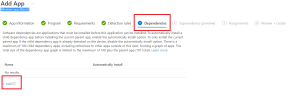
  • If you are using packaging tool like Adminstudio, create a separate packages for pre-requisites & main application and then import the packages using a Windows programme (Win32) . Note: add the dependency package in the dependencies tab.
  • If you are not using Adminstudio, create a vbscript\powershell for both packages and follow the same approach.
1677666808971.png
 
Thanks for the Help MJ-Tech I am able to deploy the application with the dependencies on.
We can mark this thread as resolved.
 
Solution
Status
Not open for further replies.

Forum statistics

Threads
7,135
Messages
27,868
Members
18,159
Latest member
jordysmits
Back
Top