Forums on Intune, SCCM, and Windows 11

Welcome to the forums. Register a free account today to become a member! Once signed in, you'll be able to participate on this site by adding your topics and posts, as well as connect with other members through your own private inbox!

SOLVED Missing CMPivot Entities in SCCM console

Status
Not open for further replies.

epolat

New Member
Messages
3
Solutions
1
Reaction score
0
Points
1
Hello,
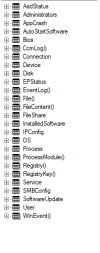
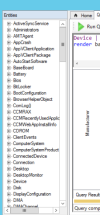
I installed CMPivot standalone and I have these entities (first pic). Also when I take a look cmpivot docs on internet and supported entities on microsoft website, there are alot of different entities which I don't have (second pic). Even for example when I write Processor (microsoft says it's supported), cmpivot says Unknown entity Processor. My configuration manager version is 2409.
1745575804053.png1745576397434.png
So why do some entities seem missing? and how can I add these entities which I don't have?

Thanks
 
Solution
Thx for reply. I see same entries on sccm consol cmpivot, still there are missing entries. Secondly, I checked hardware inventory. All necessery hardware infos are enabled. For example, processor info is checked but there is no processor entry on cmpivot.
Thx I solved the problem. It was all about cmpivot permissions on sccm console (administration->security tab)
Hello,
I installed CMPivot standalone and I have these entities (first pic). Also when I take a look cmpivot docs on internet and supported entities on microsoft website, there are alot of different entities which I don't have (second pic). Even for example when I write Processor (microsoft says it's supported), cmpivot says Unknown entity Processor. My configuration manager version is 2409.
View attachment 7176View attachment 7177
So why do some entities seem missing? and how can I add these entities which I don't have?

Thanks
First Do you see the entries within the Console itself. Next did you adjust what hardware inventory is enabled?
 
First Do you see the entries within the Console itself. Next did you adjust what hardware inventory is enabled?
Thx for reply. I see same entries on sccm consol cmpivot, still there are missing entries. Secondly, I checked hardware inventory. All necessery hardware infos are enabled. For example, processor info is checked but there is no processor entry on cmpivot.
 
Thx for reply. I see same entries on sccm consol cmpivot, still there are missing entries. Secondly, I checked hardware inventory. All necessery hardware infos are enabled. For example, processor info is checked but there is no processor entry on cmpivot.
Thx I solved the problem. It was all about cmpivot permissions on sccm console (administration->security tab)
 
Solution
Status
Not open for further replies.

Forum statistics

Threads
7,130
Messages
27,846
Members
18,145
Latest member
Rothgar
Back
Top