Forums on Intune, SCCM, and Windows 11

Welcome to the forums. Register a free account today to become a member! Once signed in, you'll be able to participate on this site by adding your topics and posts, as well as connect with other members through your own private inbox!
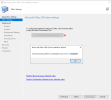
PENDING Microsoft Office client installation wizard error 0x80004001

Ahmed Hassan

Member
Messages
16
Solutions
1
Reaction score
0
Points
1
I am trying to add an office 365 installer from sccm console office 365 client management but I always get an error during the office setting step "failed launching office customization tool, error =0x80004001
 

Attachments

  • error.png
    error.png
    35 KB · Views: 11
I am trying to add an office 365 installer from sccm console office 365 client management but I always get an error during the office setting step "failed launching office customization tool, error =0x80004001
Are you trying to import from the client or the server?

If you are trying from a server, please ensure that you have an internet connection and that you are able to access the Office Customization Tool - https://config.office.com/.

then,

Restart the Server & try the option again.
 
Are you trying to import from the client or the server?

If you are trying from a server, please ensure that you have an internet connection and that you are able to access the Office Customization Tool - https://config.office.com/.

then,

Restart the Server & try the option again.
I am trying to import from the server and I am sure that the server has access to the internet and I am able to access the Office Customization Tool - https://config.office.com/. I will restart the server and try after restart
 
Do you receive this error when you click the button?

Verify your content location to see if any corrupted files are there. i.e., target directory must be empty.

Launch the console from the client machine and check whether the problem persists?

We also have another option for installing the 365 app: we can download the offline installer and create a package.
 
Last edited:
Do you receive this error when you click the button?

Verify your content location to see if any corrupted files are there. i.e., target directory must be empty.

Launch the console from the client machine and check whether the problem persists?

We also have another option for installing the 365 app: we can download the offline installer and create a package.
Yes, I received the error once I click the button. The directory is empty, yes. I will give a try to run it from the client, I will do it by tomorrow and I will inform you with the result.
Finally many thanks for your support.
 
Yes, I received the error once I click the button. The directory is empty, yes. I will give a try to run it from the client, I will do it by tomorrow and I will inform you with the result.
Finally many thanks for your support.
Hi, I have tried from a client and it seems it's working. but I need to run it from the server. I hope there is a solution to the server problem.
 
It's good to see that this tool is working for you on the client PC.

Could you look at Eventviewer to see if you can detect any errors(server)?
 
Last edited:
sorry for the late reply, I can not see any related errors on the server, but when I try to do that from the client I had to install WebView2 console extension in order to download the content.
 
If you look at the error code0x80004001, this occurs due to misconfigured system files in your windows operating system. So I think either the Server on which the ConfigMgr is running has issues or it could be blocked by security software.
 

Forum statistics

Threads
7,144
Messages
27,894
Members
18,190
Latest member
escdarck

Trending content

Back
Top