Forums on Intune, SCCM, and Windows 11

Welcome to the forums. Register a free account today to become a member! Once signed in, you'll be able to participate on this site by adding your topics and posts, as well as connect with other members through your own private inbox!

SOLVED Microsoft 365 updates not downloading?

  • Thread starter Thread starter CrisKolkman
  • Start date Start date
  • Replies Replies 4
  • Views Views 4K
Status
Not open for further replies.

CrisKolkman

Active Member
Messages
26
Solutions
2
Reaction score
0
Points
1
Hello,

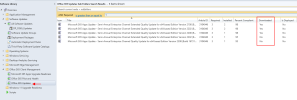
Our MECM is working fine when it comes to Software Updates, but we also enabled it to download Microsoft 365 Apps/Office 2019/Office LTSC updates, but they just don't seem to download.
Any idea what could cause this?

1717675408580.png
 
Last edited:
Solution
Do you see any errors in wsyncmgr.log?
Hello,

Thank you for the fast reply!
There are no errors but I think I was just being stupid, the updates seems to be put in a different folder (see screenshot below) and my current Automatic Deployment Rule (targeting Product Microsoft 365...) didn't do anything.
I created a new ADR and just waiting for it to finish, but it seems it is downloading the Office updates now:

1717682737378.png
Do you see any errors in wsyncmgr.log?
Hello,

Thank you for the fast reply!
There are no errors but I think I was just being stupid, the updates seems to be put in a different folder (see screenshot below) and my current Automatic Deployment Rule (targeting Product Microsoft 365...) didn't do anything.
I created a new ADR and just waiting for it to finish, but it seems it is downloading the Office updates now:

1717682737378.png
 
Solution
Hello,

Thank you for the fast reply!
There are no errors but I think I was just being stupid, the updates seems to be put in a different folder (see screenshot below) and my current Automatic Deployment Rule (targeting Product Microsoft 365...) didn't do anything.
I created a new ADR and just waiting for it to finish, but it seems it is downloading the Office updates now:

View attachment 6254
This seems to be working, closing this thread for now.
 
Status
Not open for further replies.
Back
Top