
We've got a package to install O365 that is working flawlessly on some computers and failing immediately on others. On the failing computers, Software Center is giving an error message of "The software could not be found on any servers at this time".
AppEnforce log says:
Invalid executable file PowerShell.exe AppEnforce 4/9/2024 2:37:23 PM 1264 (0x04F0)
CMsiHandler::EnforceApp failed (0x87d01106). AppEnforce 4/9/2024 2:37:23 PM 1264 (0x04F0)
AppProvider::EnforceApp - Failed to invoke EnforceApp on Application handler(0x87d01106). AppEnforce 4/9/2024 2:37:23 PM 1264 (0x04F0)
CommenceEnforcement failed with error 0x87d01106. AppEnforce 4/9/2024 2:37:23 PM 1264 (0x04F0)
Method CommenceEnforcement failed with error code 87D01106 AppEnforce 4/9/2024 2:37:23 PM 1264 (0x04F0)
++++++ Failed to enforce app. Error 0x87d01106. ++++++ AppEnforce 4/9/2024 2:37:23 PM 1264 (0x04F0)
0x87d01106 led me to believe those endpoints are having trouble not having the full powershell path in the Installation Program:
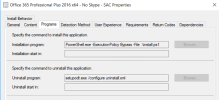
So, I changed it to use the full path: %SystemRoot%\system32\WindowsPowerShell\v1.0\PowerShell.exe -ExecutionPolicy Bypass -File .\install.ps1
It now progresses a little further, failing with 0x87D00324(-2016410844). Now AppEnforce says:
+++ Starting Install enforcement for App DT "Office 365 Professional Plus 2016 x64 - No Skype - SAC" ApplicationDeliveryType - ScopeId_209059C8-4AC8-44C6-803C-9B729BCFE00B/DeploymentType_cfdefb9b-ba5b-40e1-8f40-429f32a541e4, Revision - 8, ContentPath - C:\WINDOWS\ccmcache\3, Execution Context - System AppEnforce 4/9/2024 3:39:39 PM 5520 (0x1590)
Performing detection of app deployment type Office 365 Professional Plus 2016 x64 - No Skype - SAC(ScopeId_209059C8-4AC8-44C6-803C-9B729BCFE00B/DeploymentType_cfdefb9b-ba5b-40e1-8f40-429f32a541e4, revision 8) for system. AppEnforce 4/9/2024 3:39:39 PM 5520 (0x1590)
+++ Application not discovered with script detection. [AppDT Id: ScopeId_209059C8-4AC8-44C6-803C-9B729BCFE00B/DeploymentType_cfdefb9b-ba5b-40e1-8f40-429f32a541e4, Revision: 8] AppEnforce 4/9/2024 3:39:39 PM 5520 (0x1590)
App enforcement environment:
Context: Machine
Command line: %SystemRoot%\system32\WindowsPowerShell\v1.0\PowerShell.exe -ExecutionPolicy Bypass -File .\install.ps1
Allow user interaction: No
UI mode: 0
User token: null
Session Id: 2
Content path: C:\WINDOWS\ccmcache\3
Working directory: AppEnforce 4/9/2024 3:39:39 PM 5520 (0x1590)
Prepared working directory: C:\WINDOWS\ccmcache\3 AppEnforce 4/9/2024 3:39:39 PM 5520 (0x1590)
Prepared command line: "C:\WINDOWS\system32\WindowsPowerShell\v1.0\powershell.exe" -ExecutionPolicy Bypass -File .\install.ps1 AppEnforce 4/9/2024 3:39:39 PM 5520 (0x1590)
Executing Command line: "C:\WINDOWS\system32\WindowsPowerShell\v1.0\powershell.exe" -ExecutionPolicy Bypass -File .\install.ps1 with user context AppEnforce 4/9/2024 3:39:39 PM 5520 (0x1590)
Working directory C:\WINDOWS\ccmcache\3 AppEnforce 4/9/2024 3:39:39 PM 5520 (0x1590)
Post install behavior is BasedOnExitCode AppEnforce 4/9/2024 3:39:39 PM 5520 (0x1590)
Waiting for process 4420 to finish. Timeout = 60 minutes. AppEnforce 4/9/2024 3:39:39 PM 5520 (0x1590)
Process 4420 terminated with exitcode: 0 AppEnforce 4/9/2024 3:40:41 PM 5520 (0x1590)
Looking for exit code 0 in exit codes table... AppEnforce 4/9/2024 3:40:41 PM 5520 (0x1590)
Matched exit code 0 to a Success entry in exit codes table. AppEnforce 4/9/2024 3:40:41 PM 5520 (0x1590)
Performing detection of app deployment type Office 365 Professional Plus 2016 x64 - No Skype - SAC(ScopeId_209059C8-4AC8-44C6-803C-9B729BCFE00B/DeploymentType_cfdefb9b-ba5b-40e1-8f40-429f32a541e4, revision 8) for system. AppEnforce 4/9/2024 3:40:41 PM 5520 (0x1590)
+++ Application not discovered with script detection. [AppDT Id: ScopeId_209059C8-4AC8-44C6-803C-9B729BCFE00B/DeploymentType_cfdefb9b-ba5b-40e1-8f40-429f32a541e4, Revision: 8] AppEnforce 4/9/2024 3:40:41 PM 5520 (0x1590)
++++++ App enforcement completed (61 seconds) for App DT "Office 365 Professional Plus 2016 x64 - No Skype - SAC" [ScopeId_209059C8-4AC8-44C6-803C-9B729BCFE00B/DeploymentType_cfdefb9b-ba5b-40e1-8f40-429f32a541e4], Revision: 8, User SID: ] ++++++ AppEnforce 4/9/2024 3:40:41 PM 5520 (0x1590)
Any thoughts as to why some computers are having trouble with powershell and others aren't? They get the same GPOs, so I don't think it's that. I can't seem to find a common denominator to help isolate the issue.
Thanks in advance!
AppEnforce log says:
Invalid executable file PowerShell.exe AppEnforce 4/9/2024 2:37:23 PM 1264 (0x04F0)
CMsiHandler::EnforceApp failed (0x87d01106). AppEnforce 4/9/2024 2:37:23 PM 1264 (0x04F0)
AppProvider::EnforceApp - Failed to invoke EnforceApp on Application handler(0x87d01106). AppEnforce 4/9/2024 2:37:23 PM 1264 (0x04F0)
CommenceEnforcement failed with error 0x87d01106. AppEnforce 4/9/2024 2:37:23 PM 1264 (0x04F0)
Method CommenceEnforcement failed with error code 87D01106 AppEnforce 4/9/2024 2:37:23 PM 1264 (0x04F0)
++++++ Failed to enforce app. Error 0x87d01106. ++++++ AppEnforce 4/9/2024 2:37:23 PM 1264 (0x04F0)
0x87d01106 led me to believe those endpoints are having trouble not having the full powershell path in the Installation Program:
So, I changed it to use the full path: %SystemRoot%\system32\WindowsPowerShell\v1.0\PowerShell.exe -ExecutionPolicy Bypass -File .\install.ps1
It now progresses a little further, failing with 0x87D00324(-2016410844). Now AppEnforce says:
+++ Starting Install enforcement for App DT "Office 365 Professional Plus 2016 x64 - No Skype - SAC" ApplicationDeliveryType - ScopeId_209059C8-4AC8-44C6-803C-9B729BCFE00B/DeploymentType_cfdefb9b-ba5b-40e1-8f40-429f32a541e4, Revision - 8, ContentPath - C:\WINDOWS\ccmcache\3, Execution Context - System AppEnforce 4/9/2024 3:39:39 PM 5520 (0x1590)
Performing detection of app deployment type Office 365 Professional Plus 2016 x64 - No Skype - SAC(ScopeId_209059C8-4AC8-44C6-803C-9B729BCFE00B/DeploymentType_cfdefb9b-ba5b-40e1-8f40-429f32a541e4, revision 8) for system. AppEnforce 4/9/2024 3:39:39 PM 5520 (0x1590)
+++ Application not discovered with script detection. [AppDT Id: ScopeId_209059C8-4AC8-44C6-803C-9B729BCFE00B/DeploymentType_cfdefb9b-ba5b-40e1-8f40-429f32a541e4, Revision: 8] AppEnforce 4/9/2024 3:39:39 PM 5520 (0x1590)
App enforcement environment:
Context: Machine
Command line: %SystemRoot%\system32\WindowsPowerShell\v1.0\PowerShell.exe -ExecutionPolicy Bypass -File .\install.ps1
Allow user interaction: No
UI mode: 0
User token: null
Session Id: 2
Content path: C:\WINDOWS\ccmcache\3
Working directory: AppEnforce 4/9/2024 3:39:39 PM 5520 (0x1590)
Prepared working directory: C:\WINDOWS\ccmcache\3 AppEnforce 4/9/2024 3:39:39 PM 5520 (0x1590)
Prepared command line: "C:\WINDOWS\system32\WindowsPowerShell\v1.0\powershell.exe" -ExecutionPolicy Bypass -File .\install.ps1 AppEnforce 4/9/2024 3:39:39 PM 5520 (0x1590)
Executing Command line: "C:\WINDOWS\system32\WindowsPowerShell\v1.0\powershell.exe" -ExecutionPolicy Bypass -File .\install.ps1 with user context AppEnforce 4/9/2024 3:39:39 PM 5520 (0x1590)
Working directory C:\WINDOWS\ccmcache\3 AppEnforce 4/9/2024 3:39:39 PM 5520 (0x1590)
Post install behavior is BasedOnExitCode AppEnforce 4/9/2024 3:39:39 PM 5520 (0x1590)
Waiting for process 4420 to finish. Timeout = 60 minutes. AppEnforce 4/9/2024 3:39:39 PM 5520 (0x1590)
Process 4420 terminated with exitcode: 0 AppEnforce 4/9/2024 3:40:41 PM 5520 (0x1590)
Looking for exit code 0 in exit codes table... AppEnforce 4/9/2024 3:40:41 PM 5520 (0x1590)
Matched exit code 0 to a Success entry in exit codes table. AppEnforce 4/9/2024 3:40:41 PM 5520 (0x1590)
Performing detection of app deployment type Office 365 Professional Plus 2016 x64 - No Skype - SAC(ScopeId_209059C8-4AC8-44C6-803C-9B729BCFE00B/DeploymentType_cfdefb9b-ba5b-40e1-8f40-429f32a541e4, revision 8) for system. AppEnforce 4/9/2024 3:40:41 PM 5520 (0x1590)
+++ Application not discovered with script detection. [AppDT Id: ScopeId_209059C8-4AC8-44C6-803C-9B729BCFE00B/DeploymentType_cfdefb9b-ba5b-40e1-8f40-429f32a541e4, Revision: 8] AppEnforce 4/9/2024 3:40:41 PM 5520 (0x1590)
++++++ App enforcement completed (61 seconds) for App DT "Office 365 Professional Plus 2016 x64 - No Skype - SAC" [ScopeId_209059C8-4AC8-44C6-803C-9B729BCFE00B/DeploymentType_cfdefb9b-ba5b-40e1-8f40-429f32a541e4], Revision: 8, User SID: ] ++++++ AppEnforce 4/9/2024 3:40:41 PM 5520 (0x1590)
Any thoughts as to why some computers are having trouble with powershell and others aren't? They get the same GPOs, so I don't think it's that. I can't seem to find a common denominator to help isolate the issue.
Thanks in advance!


