Forums on Intune, SCCM, and Windows 11

Welcome to the forums. Register a free account today to become a member! Once signed in, you'll be able to participate on this site by adding your topics and posts, as well as connect with other members through your own private inbox!

PENDING Management point failed to install after 2403 update

northernsky1

New Member
Messages
2
Reaction score
0
Points
1
Hello - After I installed the 2403 update I was checking the Componant status and the Management Point role was Critical with this critical error (below). I see the sms_site_componant_mananger service is running fine but I am not sure how to trouble shoot this. In the Componant Status page for the sms_site_componant_mananger it says for Type: Componant Not installed bt Site Component Manager. What can I do to troubleshoot this? I did check the srspMSI.log and saw no errors as well as the srspsetup.log.

Severity Type Site code Date / Time System Component Message ID Description
Error Milestone ICW 5/15/2024 6:28:43 AM SCCM2019.CO.ISLAND.WA.US SMS_MP_CONTROL_MANAGER 1020 Site Component Manager failed to reinstall this component on this site system. Solution: Review the previous status messages to determine the exact reason for the failure. Site Component Manager will automatically retry the reinstallation in 60 minutes. To force Site Component Manager to immediately retry the reinstallation, stop and restart Site Component Manager using the Configuration Manager Service Manager.

Thanks,

Scott
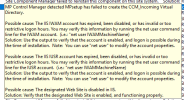
 
This is the error I am getting now in the status message viewer: Not sure exactly how to fix this right now but am researching. If anyone can help I would appreciate it. I Previously has HTTP/HTTPS selected in the previous version before 2403 and now I have it set EHTTP.
1715791242366.png
 
I'm having the same problem after upgrading to 2403.
I removed MP and it was failing to Install I had to update the schema
But some of my client are showing question mark and some show active green and some are show cross inactive
 
Hello - After I installed the 2403 update I was checking the Componant status and the Management Point role was Critical with this critical error (below). I see the sms_site_componant_mananger service is running fine but I am not sure how to trouble shoot this. In the Componant Status page for the sms_site_componant_mananger it says for Type: Componant Not installed bt Site Component Manager. What can I do to troubleshoot this? I did check the srspMSI.log and saw no errors as well as the srspsetup.log.

Severity Type Site code Date / Time System Component Message ID Description
Error Milestone ICW 5/15/2024 6:28:43 AM SCCM2019.CO.ISLAND.WA.US SMS_MP_CONTROL_MANAGER 1020 Site Component Manager failed to reinstall this component on this site system. Solution: Review the previous status messages to determine the exact reason for the failure. Site Component Manager will automatically retry the reinstallation in 60 minutes. To force Site Component Manager to immediately retry the reinstallation, stop and restart Site Component Manager using the Configuration Manager Service Manager.

Thanks,

Scott
Any resolution for this? Have the same issue after upgrading.
 
Same issue here after upgrade to 2403. Anyone got any ideas? SCCM was working over https only with pki on previous version.
 
This is the error I am getting now in the status message viewer: Not sure exactly how to fix this right now but am researching. If anyone can help I would appreciate it. I Previously has HTTP/HTTPS selected in the previous version before 2403 and now I have it set EHTTP.
View attachment 6203
Hello ,

Is this issue resolved.? If it's resolved please let me know the solution for this issue
 
Tried to remove MP and reinstall, but still seen various Application Error events in Event Viewer > Windows Logs > Application related to CcmExec.exe.
I have resolved the issue running below PowerShell commands on the server. Once run restarted SCCM server and all started to work.

Set-ProcessMitigation -Name smsexec.exe -Disable UserShadowStack
Set-ProcessMitigation -Name ccmexec.exe -Disable UserShadowStack
 
Tried to remove MP and reinstall, but still seen various Application Error events in Event Viewer > Windows Logs > Application related to CcmExec.exe.
I have resolved the issue running below PowerShell commands on the server. Once run restarted SCCM server and all started to work.

Set-ProcessMitigation -Name smsexec.exe -Disable UserShadowStack
Set-ProcessMitigation -Name ccmexec.exe -Disable UserShadowStack
Was this workaround suggested by Microsoft?
 
Back
Top