Forums on Intune, SCCM, and Windows 11

Welcome to the forums. Register a free account today to become a member! Once signed in, you'll be able to participate on this site by adding your topics and posts, as well as connect with other members through your own private inbox!

SOLVED Issue with PXE booting

  • Thread starter Thread starter manesh1983
  • Start date Start date
  • Replies Replies 7
  • Views Views 5K
Status
Not open for further replies.

manesh1983

Member
Messages
20
Solutions
2
Reaction score
0
Points
1
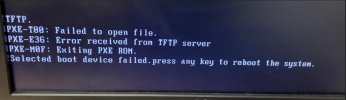
I have facing an issue with PXE booting. While trying to boot through PXE it shows PXE--T00: Failed to Open File (Also getting PXE-E36,PXE-M0F), but after delete the target machine from SCCM Administration console -> Assets and Compliance -> Devices, I can able to boot with the PXE service. Is it any solution for avoid the manual device deletion from SCCM?
 

Attachments

  • ms-teams_vu7qdrRjHb.jpg
    ms-teams_vu7qdrRjHb.jpg
    171.8 KB · Views: 18
Thanks for the reply. I have resolved this issue with the one change in client machine BIOS configuration, there was a setting called Intel "VMD", turned it off and that PXE boot worked and successfully updated the OS.
 
I am facing an issue with PXE booting. While trying to boot through PXE it shows PXE--T00: Failed to Open File (Also getting PXE-E36, PXE-M0F), but after deleting the target machine from SCCM Administration console -> Assets and Compliance -> Devices, I can able to boot with the PXE service. Is there any solution to avoid the manual device deletion from SCCM?

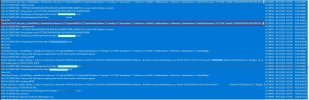
please find the SMSPXE log file. After getting this error I searched for this Mac address in the SCCM management console ->Devices -> Search with that Mac address and delete that system. After this step I rebooted the same workstation, in that time it was perfectly booted with PXE.

Can you please give me a solution to avoid the device deletion every time?
 

Attachments

  • SMSPXE-Log.jpg
    SMSPXE-Log.jpg
    196 KB · Views: 15
In my previous organization, I encountered the same issue where I had to delete the devices from the ConfigMgr database for PXE boot to work. We were manually importing the devices into SCCM using a Mac address for imaging. I had to log a call with Microsoft support to troubleshoot this issue.
 
Thanks for the update. I will log the call regarding this into Microsoft support. Request you to close this tread as resolved
 
Status
Not open for further replies.
Back
Top