
Hi,
I wonder if somebody could help me out please.
I need to apply a new Windows Wallpaper Profile to our devices using intune. I have set the profile up:
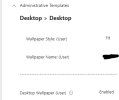
This works well on our staff devices as staff are the primary users of their devices but this doesn't apply to our Student users who can use a large number of devices in our Libraries.
Is there any way that this user setting can apply to the students even when they are not the primary users of the devices?
Thanks
Craig
I wonder if somebody could help me out please.
I need to apply a new Windows Wallpaper Profile to our devices using intune. I have set the profile up:
This works well on our staff devices as staff are the primary users of their devices but this doesn't apply to our Student users who can use a large number of devices in our Libraries.
Is there any way that this user setting can apply to the students even when they are not the primary users of the devices?
Thanks
Craig


