Forums on Intune, SCCM, and Windows 11

Welcome to the forums. Register a free account today to become a member! Once signed in, you'll be able to participate on this site by adding your topics and posts, as well as connect with other members through your own private inbox!

PENDING Intune Error code 0x87D1041C - Followup

  • Thread starter Thread starter Mokshith
  • Start date Start date
  • Replies Replies 14
  • Views Views 8K

Mokshith

Member
Messages
6
Reaction score
0
Points
1
I am creating a win32 App in Intune, i have tried all the possible detection logic.
File, MSI, Registry.
The installation is successful but Intune gives the error
Even stranger is if i re run the installation - the detection works and shows as Installed
Tested on 3 devices its the same behavior
 
I am creating a win32 App in Intune, i have tried all the possible detection logic.
File, MSI, Registry.
The installation is successful but Intune gives the error
Even stranger is if i re run the installation - the detection works and shows as Installed
Tested on 3 devices its the same behavior
Do you get this error message almost immediately after the install is triggered?
 
Do you get this error message almost immediately after the install is triggered?
for the first time, the installation does take time and the setup is complete.
Verified by launching the app, but the company portal status says failed.
retriggering the install, immediately the detection logic works and it says successful.
So the detection logic is correct, but why is the status showing as failed on the first attempt
 
Either the detection method used is incorrect or the application installer has a problem. Worth checking with Snagit support once.
 
Either the detection method used is incorrect or the application installer has a problem. Worth checking with Snagit support once.
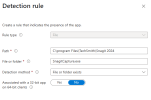
Detection Logic is correct i believe, cause the 2nd rerun detects the app installation and shows as the app is installed. its the first install thats throwing the error.
Happening specifically to this Snagit app. Other apps i have used the same detection and works

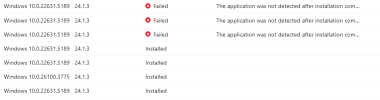
1746807314877.png

1746807459052.png
The ones that are failed, if i rerun from Company portal they instantly change to Installed
 
Last edited:
for the first time, the installation does take time and the setup is complete.
Verified by launching the app, but the company portal status says failed.
retriggering the install, immediately the detection logic works and it says successful.
So the detection logic is correct, but why is the status showing as failed on the first attempt
this will almost always because the setup is triggering a second setup without waiting for it to complete. Then ConfigMgr checks and the detention is right.but when you retry it the setup is done and everything is good. Wrap the setup in PowerShell and add a 5 second wait.
 
this will almost always because the setup is triggering a second setup without waiting for it to complete. Then ConfigMgr checks and the detention is right.but when you retry it the setup is done and everything is good. Wrap the setup in PowerShell and add a 5 second wait.
Will give this a try and update, thankyou Garth
 
for the first time, the installation does take time and the setup is complete.
Verified by launching the app, but the company portal status says failed.
retriggering the install, immediately the detection logic works and it says successful.
So the detection logic is correct, but why is the status showing as failed on the first attempt
have you tried different detection logic with MSI or registry entry?
 
Will give this a try and update, thankyou Garth
I used the below and still the same. Any suggestions please
{
# Uninstall existing Snagit
.\UninstallerTool.exe -product Snagit

# Optional: Add a short sleep to give the uninstall time to clean up
Start-Sleep -Seconds 10

# Install Snagit MSI with MST, wait for completion
Start-Process "msiexec.exe" -ArgumentList "/I `"snagit.msi`" TRANSFORMS=`"snagit.mst`" /qn" -Wait -NoNewWindow

# Wait 2 minutes after install completes
Start-Sleep -Seconds 120

Write-Output "Snagit installation completed successfully with delay."
}
catch {
Write-Error "An error occurred: $_"
Exit 1
}
 
Are you using snagit msi installer available on the download site or using installer that is created from deployment tool for enterprise?
 
I am creating a win32 App in Intune, i have tried all the possible detection logic.
File, MSI, Registry.
The installation is successful but Intune gives the error
Even stranger is if i re run the installation - the detection works and shows as Installed
Tested on 3 devices its the same behavior
Try to clean the cache,
When deploying Win32 apps through Intune, the Intune Win32 app files are cached at C:\Program Files (x86)\Microsoft Intune Management Extension\Content location.
and then recreate the deployment entirely.
 

Forum statistics

Threads
7,211
Messages
28,130
Members
18,399
Latest member
dimasyandr

Trending content

Back
Top