
Hi all,
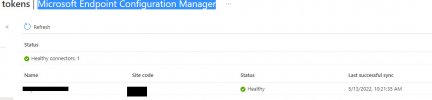
Over the past couple of weeks I have been working on setting up and testing co-management with SCCM and Intune. I managed to get the devices to Hybrid Azure AD Joined, set up the Microsoft Endpoint Configuration Manager connector, and got a handful of test computers to be Co-managed. This morning I tried to add another computer to be co-managed. Added it to the appropriate collection but it's still not showing as Co-Managed. I tried rebooting it, rejoined it to Azure, ran the WorkPlace Join tasks in Task Scheduler, ran a sync on Azure, etc. but still nothing. The device still shows as managed by ConfigMgr in the Endpoint Manager and has not checked in. One thing I noticed is the Microsoft Endpoint Configuration Manager connector shows healthy but the last sync is from 6 days ago. I don't see any way to force a sync manually. Could this be the issue? Is it safe to delete the connector and re-add it?

Thank you.
Regards,
Gregg
Over the past couple of weeks I have been working on setting up and testing co-management with SCCM and Intune. I managed to get the devices to Hybrid Azure AD Joined, set up the Microsoft Endpoint Configuration Manager connector, and got a handful of test computers to be Co-managed. This morning I tried to add another computer to be co-managed. Added it to the appropriate collection but it's still not showing as Co-Managed. I tried rebooting it, rejoined it to Azure, ran the WorkPlace Join tasks in Task Scheduler, ran a sync on Azure, etc. but still nothing. The device still shows as managed by ConfigMgr in the Endpoint Manager and has not checked in. One thing I noticed is the Microsoft Endpoint Configuration Manager connector shows healthy but the last sync is from 6 days ago. I don't see any way to force a sync manually. Could this be the issue? Is it safe to delete the connector and re-add it?
Thank you.
Regards,
Gregg


