Hello,
We have recently moved from Visio/Project LTSC to Visio Plan 2 and Project Plan 3.
In the meantime I am about to replace all existing Office versions in our environment to Office 365 (latest version available from MECM & Monthly update channel)
Office install has been a success, removing Office 2016, 2021, LTSC and existing 365 installs as well as any Visio or Project installs.
The plan was to then allow the Visio and Project users to install the desktop versions of these apps from Software Centre.
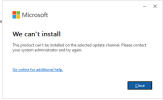
When testing the install of MS Project Desktop, I get the error "This product can't be installed on the selected update channel." (screenshot provided). Both the O365 and the Project XML specify Monthly Update channel. I have tried adjusting this to having no channel specified as per MS Office documentation but still face the same issue.
Any advice on how I can get Project and Visio desktop clients to install on top of O365?
We have recently moved from Visio/Project LTSC to Visio Plan 2 and Project Plan 3.
In the meantime I am about to replace all existing Office versions in our environment to Office 365 (latest version available from MECM & Monthly update channel)
Office install has been a success, removing Office 2016, 2021, LTSC and existing 365 installs as well as any Visio or Project installs.
The plan was to then allow the Visio and Project users to install the desktop versions of these apps from Software Centre.
When testing the install of MS Project Desktop, I get the error "This product can't be installed on the selected update channel." (screenshot provided). Both the O365 and the Project XML specify Monthly Update channel. I have tried adjusting this to having no channel specified as per MS Office documentation but still face the same issue.
Any advice on how I can get Project and Visio desktop clients to install on top of O365?