Forums on Intune, SCCM, and Windows 11

Welcome to the forums. Register a free account today to become a member! Once signed in, you'll be able to participate on this site by adding your topics and posts, as well as connect with other members through your own private inbox!

SOLVED Install application directly with command line

  • Thread starter Thread starter Nav4339
  • Start date Start date
  • Replies Replies 8
  • Views Views 8K

Nav4339

Well-Known Member
Messages
82
Reaction score
3
Points
8
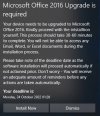
I am making use of a toast notification to notify users to install an application. Is it possible that when the user clicks on the notification, that they can trigger the install of an application directly?

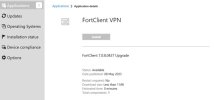
I am able to get Software Center to open up automatically when they click the Install Button on notification. I also get Software Center to go directly to the application. however it still requires the user to click the install button. Is it possible to get the installation to start directly?

So far I used these which work, but I want less user intervention.
Applications: softwarecenter:Page=AvailableSoftware
Installation Status: softwarecenter:Page=InstallationStatus
 

Attachments

  • 2.jpg
    2.jpg
    21.9 KB · Views: 15
  • 1.jpg
    1.jpg
    72.6 KB · Views: 13
I think the user will have to select Install button since the application deployed is set to available than required.
 
Thanks Prajwal, but what I want is the user to select Install and the application starts installing when they click that instead of it opening up Software Center, then they click Install again. If I am correct, and if I deploy it as Required, it will install when the policy runs without the user getting the prompt. I have tested it as a required deployment as I want the user intervention for this depployment.
 
So basically, this is my command line which works fine. It opens up software and goes directly to the application. Is it possible to setup something that starts the Install, instead the using having to click on the install button once more?

softwarecenter:SoftwareID=ScopeId_6F6A6DD7-4D8A-473B-9E84-E2A47C7BC085/Application_2aff1c8a-97bb-453d-bdfc-cfd38917a2b2
 
I have made this PS Module which query and trigger SCCM WMI for a set of actions.
There is a function called Get-SCCMAppInstallState which check the SCCM application status.
There is a funcion called Install-SCCMAppInstall which trigger SCCM application installation/uninstallation.
There are other function to check and trigger the package, TS, DCM and so on.
Please rename the attach file to .psm1 and import-module.
 

Attachments

I have made this PS Module which query and trigger SCCM WMI for a set of actions.
There is a function called Get-SCCMAppInstallState which check the SCCM application status.
There is a funcion called Install-SCCMAppInstall which trigger SCCM application installation/uninstallation.
There are other function to check and trigger the package, TS, DCM and so on.
Please rename the attach file to .psm1 and import-module.
Thank you.
 

Forum statistics

Threads
7,135
Messages
27,868
Members
18,159
Latest member
jordysmits
Back
Top