

filpped
New Member
- Messages
- 2
- Reaction score
- 1
- Points
- 0
Client : windows 10 >= 21h2
MP: 2008 server
AP: 2016 server
sccm version : 2303
I suspect there might be an issue with my connect. I've checked BgbServer.log, BGBServer.log, CcmNotificationAgent.log, and locationservices.log. In BgbServer.log, I found that the client's online status is normal, but the console is not displaying it correctly. Additionally, in the client's logs, CcmNotificationAgent.log, apart from the initial startup, it keeps indicating that I cannot discover an access point.
the ones that are not online are laptops.
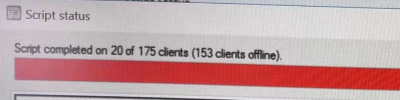
However, I have verified that there are no issues with the online status between the site and the host machines in the log. BgbServer.log.
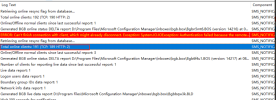
ERROR: Can't finish connection with client, which might already disconnect. Exception: System.IO.IOException: Authentication failed because the remote party has closed the transport stream.~~ at System.Net.Security.SslState.StartReadFrame(Byte[] buffer, Int32 readBytes, AsyncProtocolRequest asyncRequest)~~ at System.Net.Security.SslState.StartReceiveBlob(Byte[] buffer, AsyncProtocolRequest asyncRequest)~~ at System.Net.Security.SslState.ForceAuthentication(Boolean receiveFirst, Byte[] buffer, AsyncProtocolRequest asyncRequest)~~ at System.Net.Security.SslState.ProcessAuthentication(LazyAsyncResult lazyResult)~~ at Microsoft.ConfigurationManager.BgbServerChannel.BgbTcpListener.ProcessClient(Object state)~~ $$<SMS_NOTIFICATION_SERVER><08-03-2023 10:12:39.634-480><thread=8128 (0x1FC0)>
Retrieving online resync flag from database...~~ $$<SMS_NOTIFICATION_SERVER><08-03-2023 10:12:53.494-480><thread=4516 (0x11A4)>
Total online clients: 191 (TCP: 189 HTTP: 2)~~ $$<SMS_NOTIFICATION_SERVER><08-03-2023 10:12:53.518-480><thread=4516 (0x11A4)>
Online/Offline normal clients since last successful report: 0~~ $$<SMS_NOTIFICATION_SERVER><08-03-2023 10:12:53.537-480><thread=4516 (0x11A4)>
Receiving message from queue timeout.~~ $$<SMS_NOTIFICATION_SERVER><08-03-2023 10:13:25.453-480><thread=960 (0x3C0)>
Retrieving push tasks from database...~~ $$<SMS_NOTIFICATION_SERVER><08-03-2023 10:13:25.471-480><thread=960 (0x3C0)>
In CcmNotificationAgent.log, I found the following error messages:
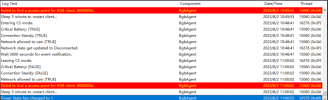
<![LOG[Failed to find a access point for BGB client. 8000000a]LOG]!><time="11:00:02.298-480" date="08-02-2023" component="BgbAgent" context="" type="3" thread="15060" file="bgbcontroller.cpp:276">
<![LOG[Sleep 5 minute to restart client...]LOG]!><time="11:00:02.298-480" date="08-02-2023" component="BgbAgent" context="" type="1" thread="15060" file="bgbcontroller.cpp:489">
<![LOG[Power State has changed to 1.]LOG]!><time="11:00:02.408-480" date="08-02-2023" component="BgbAgent" context="" type="1" thread="16576" file="systemtasks.cpp:158">
MP: 2008 server
AP: 2016 server
sccm version : 2303
I suspect there might be an issue with my connect. I've checked BgbServer.log, BGBServer.log, CcmNotificationAgent.log, and locationservices.log. In BgbServer.log, I found that the client's online status is normal, but the console is not displaying it correctly. Additionally, in the client's logs, CcmNotificationAgent.log, apart from the initial startup, it keeps indicating that I cannot discover an access point.
the ones that are not online are laptops.
However, I have verified that there are no issues with the online status between the site and the host machines in the log. BgbServer.log.
ERROR: Can't finish connection with client, which might already disconnect. Exception: System.IO.IOException: Authentication failed because the remote party has closed the transport stream.~~ at System.Net.Security.SslState.StartReadFrame(Byte[] buffer, Int32 readBytes, AsyncProtocolRequest asyncRequest)~~ at System.Net.Security.SslState.StartReceiveBlob(Byte[] buffer, AsyncProtocolRequest asyncRequest)~~ at System.Net.Security.SslState.ForceAuthentication(Boolean receiveFirst, Byte[] buffer, AsyncProtocolRequest asyncRequest)~~ at System.Net.Security.SslState.ProcessAuthentication(LazyAsyncResult lazyResult)~~ at Microsoft.ConfigurationManager.BgbServerChannel.BgbTcpListener.ProcessClient(Object state)~~ $$<SMS_NOTIFICATION_SERVER><08-03-2023 10:12:39.634-480><thread=8128 (0x1FC0)>
Retrieving online resync flag from database...~~ $$<SMS_NOTIFICATION_SERVER><08-03-2023 10:12:53.494-480><thread=4516 (0x11A4)>
Total online clients: 191 (TCP: 189 HTTP: 2)~~ $$<SMS_NOTIFICATION_SERVER><08-03-2023 10:12:53.518-480><thread=4516 (0x11A4)>
Online/Offline normal clients since last successful report: 0~~ $$<SMS_NOTIFICATION_SERVER><08-03-2023 10:12:53.537-480><thread=4516 (0x11A4)>
Receiving message from queue timeout.~~ $$<SMS_NOTIFICATION_SERVER><08-03-2023 10:13:25.453-480><thread=960 (0x3C0)>
Retrieving push tasks from database...~~ $$<SMS_NOTIFICATION_SERVER><08-03-2023 10:13:25.471-480><thread=960 (0x3C0)>
In CcmNotificationAgent.log, I found the following error messages:
<![LOG[Failed to find a access point for BGB client. 8000000a]LOG]!><time="11:00:02.298-480" date="08-02-2023" component="BgbAgent" context="" type="3" thread="15060" file="bgbcontroller.cpp:276">
<![LOG[Sleep 5 minute to restart client...]LOG]!><time="11:00:02.298-480" date="08-02-2023" component="BgbAgent" context="" type="1" thread="15060" file="bgbcontroller.cpp:489">
<![LOG[Power State has changed to 1.]LOG]!><time="11:00:02.408-480" date="08-02-2023" component="BgbAgent" context="" type="1" thread="16576" file="systemtasks.cpp:158">



