Forums on Intune, SCCM, and Windows 11

Welcome to the forums. Register a free account today to become a member! Once signed in, you'll be able to participate on this site by adding your topics and posts, as well as connect with other members through your own private inbox!

PENDING How to remove client with no agent installed

  • Thread starter Thread starter Datafast
  • Start date Start date
  • Replies Replies 14
  • Views Views 3K

Datafast

Well-Known Member
Messages
72
Reaction score
0
Points
6
I am performing a cleaning using the Maintenance tasks for deleting aged data/PC.

I can still see several PCs with no client installed present in SCCM. I couldn't find a task to do that.

Is there a way to delete also this devices?
 
Why don't you use an AD clean up script to remove the machines from AD first. That will keep your AD tidy and configuration manager will also honor it.
 
That is a task (delete) I have in progress (waiting permissions/authorizations).
In the mean time if I move those PC to a specific OU do you think can I setup Autodiscovery to exclude this OU (those PCs)?
 
The easiest way is to NOT have them listed within the OU to discover.
 
At the moment the system discovery is looking for the entire AD. How can i select the OUs where discover ?
Or avoid specific OU?
 
I am not an expert. I couldn't find in this documentation a way or rule to prevent discovery to look at specific OU in active directory.
 
I am not an expert. I couldn't find in this documentation a way or rule to prevent discovery to look at specific OU in active directory.
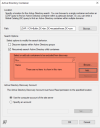
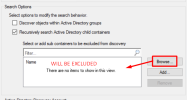
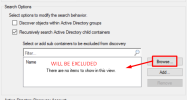
Go Look at the middle of the System discovery screen. It allows you wo excluded OU.
 

Attachments

  • AD discovery.png
    AD discovery.png
    152.6 KB · Views: 4

Forum statistics

Threads
7,157
Messages
27,935
Members
18,237
Latest member
Causal

Latest posts

Back
Top