Forums on Intune, SCCM, and Windows 11

Welcome to the forums. Register a free account today to become a member! Once signed in, you'll be able to participate on this site by adding your topics and posts, as well as connect with other members through your own private inbox!
SOLVED How to delete Superseded and Expired Updates in SCCM Console

Messages
17
Reaction score
0
Points
1
Hi,
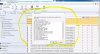
I want to delete all superseded and expired updates showing All Software Updates in SCCM Console (attached snapshot for ref.).
Any one can help in that.
Abhishek
 

Attachments

  • expired updates.JPG
    expired updates.JPG
    184 KB · Views: 205
Select all the expired update , edit membership ->remove from SUG .
You can do WSUS clean also.
 
Select all the expired update , edit membership ->remove from SUG .
You can do WSUS clean also.

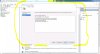
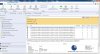
All these updates are not part of any SUG and also i had tried through WSUS cleanup wizard but the results showing Declined and Expired Updates 0 (please see the attached snapshot for your ref.)
 

Attachments

  • sccm sup.JPG
    sccm sup.JPG
    207.7 KB · Views: 139
  • sccm wsus cleanup.JPG
    sccm wsus cleanup.JPG
    115.1 KB · Views: 125
All these updates are not part of any SUG and also i had tried through WSUS cleanup wizard but the results showing Declined and Expired Updates 0 (please see the attached snapshot for your ref.)
I could have ask your version first. Here it goes

In sccm 1806 Wsus cleanup in sccm console will not remove expired update...you have to do it manually from wsus console cleanup task
From 1906 we can do it from sccm console
 
Solution

Forum statistics

Threads
7,171
Messages
27,990
Members
18,297
Latest member
Kahnrym

Trending content

Back
Top