Forums on Intune, SCCM, and Windows 11

Welcome to the forums. Register a free account today to become a member! Once signed in, you'll be able to participate on this site by adding your topics and posts, as well as connect with other members through your own private inbox!

SOLVED How can I extract a software report by team and export it to Excel using Intune?

  • Thread starter Thread starter emanuel
  • Start date Start date
  • Replies Replies 15
  • Views Views 3K
hi Garth, please i need help to get the software inventory for my company devices to keep track of the licenses. is there anyway i can do it with SCCM or through cmd
help is much appreciated.
 
Sorry it took me a while to find this, this morning but yes you can get the raw data. https://learn.microsoft.com/en-us/mem/intune/apps/app-discovered-apps

I think that I should do a blog on this.
Hi Garth;
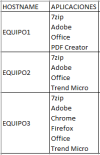
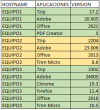
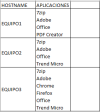
Actually what I need is to extract a report like the image I attached, with that structure, since extracting a report device by device if possible; What I want to do is extract a report where all the devices are and on the right side all the applications that each device has.
Thank you
 
hi Garth, please i need help to get the software inventory for my company devices to keep track of the licenses. is there anyway i can do it with SCCM or through cmd
help is much appreciated.
Hi Hina
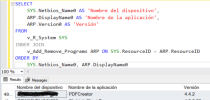
From my experience, in SCCM you can extract a software report by querying the Database:
SELECT
SYS.Netbios_Name0 AS 'Nombre del dispositivo',
ARP.DisplayName0 AS 'Nombre de la aplicación',
ARP.Version0 AS 'Versión'
FROM
v_R_System SYS
INNER JOIN
v_Add_Remove_Programs ARP ON SYS.ResourceID = ARP.ResourceID
ORDER BY
SYS.Netbios_Name0, ARP.DisplayName0
 
Hi Hina
From my experience, in SCCM you can extract a software report by querying the Database:
SELECT
SYS.Netbios_Name0 AS 'Nombre del dispositivo',
ARP.DisplayName0 AS 'Nombre de la aplicación',
ARP.Version0 AS 'Versión'
FROM
v_R_System SYS
INNER JOIN
v_Add_Remove_Programs ARP ON SYS.ResourceID = ARP.ResourceID
ORDER BY
SYS.Netbios_Name0, ARP.DisplayName0
thank you so much for help i'll test it right now
 
@emanuel may i know if you have pulled your software inventory list through sccm aswell
Yes, it doesn't work for you? Remember that you must do it in the same SCCM DB, in SQL. You create a query and tell it to show the output in a grid. You go to the grid, copy everything and paste it into an excel.
 
Yes, it doesn't work for you? Remember that you must do it in the same SCCM DB, in SQL. You create a query and tell it to show the output in a grid. You go to the grid, copy everything and paste it into an excel.
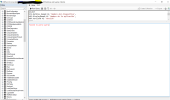
i am not sure if i am doing something wrong to run the query but its not working
 

Attachments

  • query.PNG
    query.PNG
    244.3 KB · Views: 3
hi Garth, please i need help to get the software inventory for my company devices to keep track of the licenses. is there anyway i can do it with SCCM or through cmd
help is much appreciated.
what is wrong with the built in reports for this?
 
Hi Garth;
Actually what I need is to extract a report like the image I attached, with that structure, since extracting a report device by device if possible; What I want to do is extract a report where all the devices are and on the right side all the applications that each device has.
Thank you
but this report will allow you to do this.... Did you try it?
 

Forum statistics

Threads
7,135
Messages
27,868
Members
18,157
Latest member
rajkumarkrishnan
Back
Top