
Hello everyone.
I have deployed the Windows 10 20H2 Feature Update via SCCM (download from MS Cloud Settings) to a collection of computers running 2004. It is a required deployment.
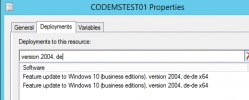
The deployments are visible in Console on the computer object:
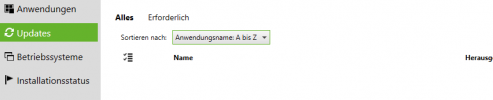
However nothing is visible in Software Center on the target computer itself:
I am a bit lost at this point and would need to investigate why the devices are not showing the required update, although it's deployed to them. Where would I start looking into this?
I´ve already rerun the following cycles:
- Machine Policy Retrieval & Evaluation Cycle
- Software Inventory Cycle
- Application Deployment Evaluation Cycle
Thanks for your help.
Patrick
I have deployed the Windows 10 20H2 Feature Update via SCCM (download from MS Cloud Settings) to a collection of computers running 2004. It is a required deployment.
The deployments are visible in Console on the computer object:
However nothing is visible in Software Center on the target computer itself:
I am a bit lost at this point and would need to investigate why the devices are not showing the required update, although it's deployed to them. Where would I start looking into this?
I´ve already rerun the following cycles:
- Machine Policy Retrieval & Evaluation Cycle
- Software Inventory Cycle
- Application Deployment Evaluation Cycle
Thanks for your help.
Patrick