Forums on Intune, SCCM, and Windows 11

Welcome to the forums. Register a free account today to become a member! Once signed in, you'll be able to participate on this site by adding your topics and posts, as well as connect with other members through your own private inbox!

SOLVED Failed to Run Task Sequence Error 0x80004005

Status
Not open for further replies.

Joris

Member
Messages
13
Reaction score
1
Points
3
Hello,

In first thank you for this website. It's helpful you have no idea :)

But unfortunately i have a problem with my testlab.
(an older colleague tell me there is no problem only solutions but there i'm forgetting something :) )

So i begun, i tried to give you a max of informations:
(don't hesitate to ask me if you need more)

Purpose :
Custom and deploy OS via PXE

Environment:

- VMware Workstation 12
- Host: Windows 10 x64
- DHCP fixed by host via VMware (Native NAT vmware option)

- Guest : Windows 2012 R2 Standard Evalution x64
Guest informations:
- SCCM 2012 SP2: console and site version 5.0.8239.1000
-SQL server 2012 x64
- DC is on it (a basic minimum farm)

Issu : (When i try to deploy via PXE to another VM)
upload_2016-1-20_9-45-7.png
upload_2016-1-20_9-42-48.png

upload_2016-1-20_9-44-9.png

Logs:
upload_2016-1-20_9-50-3.png

upload_2016-1-20_9-52-51.png


Test already tried:
Removing computer
removing and re-adding the Distribution Point
removed and re-installed the WDS role.
re-adding computers as shown http://prajwaldesai.com/deploying-windows-7-using-sccm-2012-r2/
rebooted.
restarted WDS service.

Verify time in bios it seems ok
upload_2016-1-20_10-3-19.png
(fixed by vmware i think)

Reinstalling completly the server : same issu


I think i forgetting something maybe due to server install ?
I followed all step 1 by 1 exepte server install where i add a DC on it
and hotfixe part because we don't use same version.

Don't hesitate to back to me if you need more information.
i will respond you quickly.

Best regards,

Joris

 

Attachments

  • upload_2016-1-20_9-52-42.png
    upload_2016-1-20_9-52-42.png
    91 bytes · Views: 10
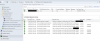
Is all the TS content available with the DP ?. Go to the Monitoring Node > Distribution Status > DP Configuration status. Select the DP > at the bottom click on Details and verify all the content has been distributed successfully.
Secondly I also want you to check the SMSTS.log file and look for any errors. As this is a lab setup, restart the SMS Executive service one and give a try.
 
Is all the TS content available with the DP ?. Go to the Monitoring Node > Distribution Status > DP Configuration status. Select the DP > at the bottom click on Details and verify all the content has been distributed successfully.
Secondly I also want you to check the SMSTS.log file and look for any errors. As this is a lab setup, restart the SMS Executive service one and give a try.

Oh thank you for your quick return

there the screenshot, all seems ok with DP
upload_2016-1-20_10-16-33.png

It seems i don't have smsts.log only smspxe in progFiles\mcm\Logs I checked via research or on the older server but similar case
upload_2016-1-20_10-20-19.png

Best regards,

Joris
 

Attachments

  • upload_2016-1-20_10-19-51.png
    upload_2016-1-20_10-19-51.png
    168.5 KB · Views: 26
  • upload_2016-1-20_10-20-9.png
    upload_2016-1-20_10-20-9.png
    82.6 KB · Views: 22
Verify that you've configured the network access account with the correct password. The error in SMSTS.log file can reveal what the issue is. I hope you have got the location of SMSTS.log file ?.
 
upload_2016-1-20_10-55-49.png

Ok i found it thank you ^^
(but last modification date is only yesterday, is it normal ?)
[location : drive\Program Files\SMS_CCM\Logs\smsts.log]

upload_2016-1-20_11-0-29.png
 
Look at the 10th line in the log file, "Failed to locate the local data path. The files needed to resume the task sequence are missing"
Re-distribute the TS content once again and try OSD.
 
Redistributtion of TS content:

Success: The task sequence has been created successfully.

Success: Create a new task sequence
• Name: Task Sequence 2
• Boot Image: Boot image (x64) 6.3.9600.16384 en-US
Success: Install the Windows operating system
• Image package: Windows 7 Professional Service Pack 1 x64 1 en-US
• Image index: 1 - 1
• Partition and format target computer: Yes
• Enable BitLocker: No
• Server licensing mode: Per seat
• Use random password: No
Success: Configure the network
• Join domain: xxxx.LOCAL
• Domain OU: LDAP://DC=xxxx ,DC=LOCAL
• Account: xxxx\Administrator
Success: Install the Configuration Manager client
• Package: Configuration Manager Client Package
Success: Configure state migration
• Capture user settings: No
• Capture network settings: No
• Capture Windows settings: No
Success: Include software updates
• Install software updates: Do not install any software updates


New deployement:

Success: General
• Software: Task Sequence 2
• Collection: Captured OS (Member Count: 1) <======= PXE machine test
• Use default distribution point groups associated to this collection: Disabled
• Automatically distribute content for dependencies: Disabled
Success: Deployment Settings
• Action: Install
• Purpose: Available
• Task sequence deployment option: Only media and PXE
• Allow clients to use a metered Internet connection to download content: Disabled
Success: Scheduling
• Schedule when this deployment will become available: Disabled
• Schedule when this deployment will expire: Disabled
• Rerun behavior: Always rerun program
Success: User Experience
• Allow users to run the program independently of assignments: Enabled
• Software installation: Disabled
• System restart (if required to complete the installation): Disabled
• Allow task sequence to run for client on the Internet: Enabled
• Commit changes at deadline or during a maintenance window (requires restarts): Enabled
• Show Task Sequence progress: Enabled
Success: Alerts
• Create a deployment alert when the threshold is lower than the following: Disabled
• Create a deployment alert when the threshold is higher than the following: Disabled
Success: Distribution Points
• Specify how clients interact with the distribution points to retrieve content from packages referred by the task sequence: Download content locally when needed by running task sequence
• When no local distribution point is available, use a remote distribution point.: Disabled
• Allow clients to use a fallback source location for content: Enabled
Success: Software Deployment Created Successfully


WDS restarted
Test = KO
no news in smsts.log (unchanged)
 
The TS is failing because it does not have content to proceed. So distribute the content to the DP, wait for few minutes and they give a try.
 
I'm update distribution point with the boot images & the os image but there is no change.
Last time update of content is ok.
Last modification of smsts.log is unchanged

Did i miss someting?
 
Hello All,

Sorry to disturb again, :)

I verify boot image version : 6.3.9.600 and OS Image (which i recreated) but no change.
Content seems to be correctly distribute
upload_2016-1-21_18-44-47.png


upload_2016-1-21_18-46-18.png
upload_2016-1-21_18-48-16.png

SMSTS.Log don't change from 2 days. Is it normal?

upload_2016-1-21_18-54-48.png

SMSPXE.logs
upload_2016-1-21_19-2-22.png

I restart WDS after i waited 10 min and i tried again but ... no change again


Do you have any idea what could i verify ?


Best regards,

Joris
 

Attachments

  • upload_2016-1-21_18-44-24.png
    upload_2016-1-21_18-44-24.png
    214.8 KB · Views: 7
  • upload_2016-1-21_18-45-49.png
    upload_2016-1-21_18-45-49.png
    19 KB · Views: 5
  • upload_2016-1-21_18-59-52.png
    upload_2016-1-21_18-59-52.png
    31.4 KB · Views: 7
Parameters of VM are corrects (similar of model) 4 RAM and 2 CPU 60Go for the initial disk 70 for the target

I don't know what i have to check.

Is it a problem if dc is on the same machine ?

I tried to deploy with network Access Account and without but ... still not ok.

Maybe a sharefolder (Reminstall is available).
or an account i have the same account for manage everything (test environement) .

Boot is x64 vers and OS image too

Best regards,

Joris
 
Last edited:
Status
Not open for further replies.

Forum statistics

Threads
7,135
Messages
27,867
Members
18,155
Latest member
DanDanDanissimo
Back
Top