Forums on Intune, SCCM, and Windows 11

Welcome to the forums. Register a free account today to become a member! Once signed in, you'll be able to participate on this site by adding your topics and posts, as well as connect with other members through your own private inbox!

SOLVED Failed to Install Pre Req CcmSetup. Return Code is 6

PrasantBaral

Member
Messages
10
Reaction score
0
Points
1
Hi guys,

I am currently having an issue with installing Management Point.

We're currently running the 2207 version.

The Manage Point failed to install after upgrading/changing the connection to HTTPS (not sure).

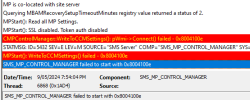
This is the log from MPSetup.log
1715312158575.png

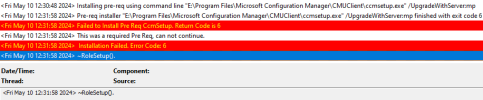
And this is from mpcontrol.log
1715312158588.png

I would appreciate, it if you could help me with the above.
 
One of the prerequisites is failing, which prevents the MP role installation. I recommend uninstalling the ccm client, repairing the MP, and then installing the ConfigMgr agent.
 
The last time when I re-install the SCCM, it caused version inconsistency. My site was running 2207 but it installed 2309. I wish there was a way to fix the Management Point only.

As you suggested in another thread, it could be a network/firewall issue. But I am unsure how to check that and ensure the issue is no longer there.
 
FYI, MS support suggested the following:
The error message is “Failed to install Pre Req Ccm setup. Return Code 6” indicates that there was an issue during the installation of the Configuration Manager console.

Please kindly try to resolve the issue following below steps:

Specify Installation Path: You can get around this error by specifying the installation path as part of your application command. For example, when running the installation command, include the target directory where you want the Configuration Manager Admin Console to be installed. Here’s an example command:

1. ConsoleSetup.exe /q DefaultSiteServerName=mymp01.christopherkibble.com TargetDir="%ProgramFiles%Microsoft Configuration ManagerAdminConsole"

Replace mymp01.christopherkibble with your actual site server name1.

  1. Check BITS (Background Intelligent Transfer Service):Sometimes issues with BITS can cause installation problems. Try the following steps:
    • Remove BITS (Background Intelligent Transfer Service).
    • Restart the server.
    • Reinstall BITS
 
Hi Prajwal,
Nope I didn't. We have found out that it was our DNS that was having the issue.
The failed downloads were not downloading when I try to download them through the same link on my machine either. But, it started downloading as soon as I hots-poted my machine to my phone.
When we check, we were using the Telstra DNS and the download was completed as soon as I switched it to Google DNS.
 
Back
Top