Welcome to the forums. Register a free account today to become a member! Once signed in, you'll be able to participate on this site by adding your topics and posts, as well as connect with other members through your own private inbox!
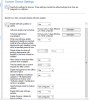
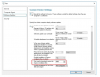
You have to select the option "ALLOW CLIENTS TO DOWNLOAD DELTA CONTENT WHEN AVAILABLE" as this client setting replaces "Enable installation of express installation files on clients "
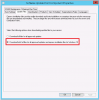
Before this , You need to change the setting in SUP as below
Configuration Manager supports express installation files for Windows 10 or later, which provide smaller downloads and faster installation times on clients.
Hi - As i mentioned, Express option has been replaced by Delta update option. You must enable the option to get the Delta update . Make sure that you are enabling the port 8005.
->
New settings for server and client are needed in order to manage Delta installation files.
A modification must be done to the Software Update Point component:
1. Open SCCM console, go to Administration / Site Configuration / Sites / Configure Site Components and select Software Update Point
2.On the Update Files tab, a new setting is available. Download both full files for all approved updates and express installation files for Windows 10
3. change the client setting as i mentioned earlier
NP .
You can check in your download folder of the updates.it will mention Express .so get the update number from downlaod folder(where you are actually downloading the Updates) Then search in clients with the same update .
Soon I will make an article on delta update installation.