
SukeSamurai
New Member
- Messages
- 1
- Reaction score
- 0
- Points
- 1
I am running test for upgrading our Win 10 Pro machines to Win 11 Pro using SCCM.
I have followed the guides to use a Software Package deployment. I have setup a deployment using the 'Windows 11, version 22H2 x64 2024-12B' package.

The package is downloaded, and I have a pretty basic deployment setup to a test collection. The test collection just has a single Win 10 machine that I use for testing.
Initially I have the deployment type set as 'Available'.
The upgrade appears on my client test machine, and I am able to hit install. I get a prompt about the upgrade, just like the image below:
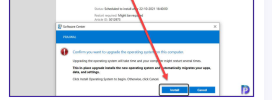
I click 'Install', the download begins and completes (about 25 minutes, during which time I can see the content being added to ccmcache). Then it goes to installing (about another 20 minutes). At that point, I am prompted for a restart. After the restart, the Win 11 upgrade is complete, and after alittle bit of time, SCCM sees the machine's new OS. So exactly what I want.
However, I am looking for this upgrade to automatically happen without user interaction.
So I update my deployment to 'Required', and set the deadline to ASAP. I then add another test machine (identical to my previous Win 10 test machine) to my test deployment group. After a short amount of time, I see a notification on my second test machine that a new software update is downloading (so it started automatically).
However, when I check on the download/installation, it is stuck at 0%. After sometime, it comes back with an error saying it failed, with the error code 0x80D02002(-2133843966). When I check in ccmcache, I don't see any cached folders created (unlike when I tried this method with the 'Available' option). If I hit the 'Retry' button for the upgrade, it does the same thing again (fail with the same error code).
Any idea what could be causing this?
(As a side note, I have tested changing the deployment BACK to 'Available' after multiple 'Required' failed attempts. When I do, and my client gets the deployment type change, I am able to click Install (and click the second install from the prompt), and the download and install works as normal...)
I have followed the guides to use a Software Package deployment. I have setup a deployment using the 'Windows 11, version 22H2 x64 2024-12B' package.
The package is downloaded, and I have a pretty basic deployment setup to a test collection. The test collection just has a single Win 10 machine that I use for testing.
Initially I have the deployment type set as 'Available'.
The upgrade appears on my client test machine, and I am able to hit install. I get a prompt about the upgrade, just like the image below:
I click 'Install', the download begins and completes (about 25 minutes, during which time I can see the content being added to ccmcache). Then it goes to installing (about another 20 minutes). At that point, I am prompted for a restart. After the restart, the Win 11 upgrade is complete, and after alittle bit of time, SCCM sees the machine's new OS. So exactly what I want.
However, I am looking for this upgrade to automatically happen without user interaction.
So I update my deployment to 'Required', and set the deadline to ASAP. I then add another test machine (identical to my previous Win 10 test machine) to my test deployment group. After a short amount of time, I see a notification on my second test machine that a new software update is downloading (so it started automatically).
However, when I check on the download/installation, it is stuck at 0%. After sometime, it comes back with an error saying it failed, with the error code 0x80D02002(-2133843966). When I check in ccmcache, I don't see any cached folders created (unlike when I tried this method with the 'Available' option). If I hit the 'Retry' button for the upgrade, it does the same thing again (fail with the same error code).
Any idea what could be causing this?
(As a side note, I have tested changing the deployment BACK to 'Available' after multiple 'Required' failed attempts. When I do, and my client gets the deployment type change, I am able to click Install (and click the second install from the prompt), and the download and install works as normal...)

