
Paakan Soloki
Member
- Messages
- 7
- Reaction score
- 0
- Points
- 1
Hello,
I have been trying to add a BIOS update to our Task Sequence for a specific Dell model.(Optiplex 5040)
I get this error every time:
"The task sequence execution engine failed executing the action (Flash Bios Optiplex 5040) in the group (Modern Bios Management) with the error code 2147942616
Action output: ... Command line for extension .exe is "%1" %*
Set command line: Run command line
Working dir 'C:\_SMSTaskSequence\Packages\K2E00118'
Executing command line: Run command line with options (0, 4)
CreateProcess( NULL, (LPWSTR)m_sCommandLine.c_str(), NULL, NULL, TRUE, bNT ? CREATE_UNICODE_ENVIRONMENT : 0, m_pEnvironmentBlock, pszWorkingDir, &si, &pi ), HRESULT=800700d8 (..\CommandLine.cpp,1030)
clCommandLine.Execute( uOptions, pszWorkingDir, lpDesktop), HRESULT=800700d8 (runcommandline.cpp,465)
ReleaseSource() for C:\_SMSTaskSequence\Packages\K2E00118.
reference count 1 for the source C:\_SMSTaskSequence\Packages\K2E00118 before releasing
Released the resolved source C:\_SMSTaskSequence\Packages\K2E00118
cmd.Execute(pszPkgID, sProgramName.c_str(), sOutputVariableName.c_str(), dwCmdLineExitCode), HRESULT=800700d8 (main.cpp,395)
CreateProcess failed. Code(0x800700D8)
Command line execution failed (800700D8)
Failed to execute command line
Install Software failed to run command line, hr=0x800700d8. The operating system reported error 2147942616: This version of %1 is not compatible with the version of Windows you're running. Check your computer's system information and then contact the software publisher."
I got the Bios file from the Dell website while searching the Service Tag of the device.
This is a screenshot of the Task Sequence:
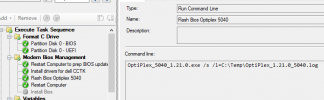
Can anyone help resolve this issue?
Thanks.
I have been trying to add a BIOS update to our Task Sequence for a specific Dell model.(Optiplex 5040)
I get this error every time:
"The task sequence execution engine failed executing the action (Flash Bios Optiplex 5040) in the group (Modern Bios Management) with the error code 2147942616
Action output: ... Command line for extension .exe is "%1" %*
Set command line: Run command line
Working dir 'C:\_SMSTaskSequence\Packages\K2E00118'
Executing command line: Run command line with options (0, 4)
CreateProcess( NULL, (LPWSTR)m_sCommandLine.c_str(), NULL, NULL, TRUE, bNT ? CREATE_UNICODE_ENVIRONMENT : 0, m_pEnvironmentBlock, pszWorkingDir, &si, &pi ), HRESULT=800700d8 (..\CommandLine.cpp,1030)
clCommandLine.Execute( uOptions, pszWorkingDir, lpDesktop), HRESULT=800700d8 (runcommandline.cpp,465)
ReleaseSource() for C:\_SMSTaskSequence\Packages\K2E00118.
reference count 1 for the source C:\_SMSTaskSequence\Packages\K2E00118 before releasing
Released the resolved source C:\_SMSTaskSequence\Packages\K2E00118
cmd.Execute(pszPkgID, sProgramName.c_str(), sOutputVariableName.c_str(), dwCmdLineExitCode), HRESULT=800700d8 (main.cpp,395)
CreateProcess failed. Code(0x800700D8)
Command line execution failed (800700D8)
Failed to execute command line
Install Software failed to run command line, hr=0x800700d8. The operating system reported error 2147942616: This version of %1 is not compatible with the version of Windows you're running. Check your computer's system information and then contact the software publisher."
I got the Bios file from the Dell website while searching the Service Tag of the device.
This is a screenshot of the Task Sequence:
Can anyone help resolve this issue?
Thanks.


