Forums on Intune, SCCM, and Windows 11

Welcome to the forums. Register a free account today to become a member! Once signed in, you'll be able to participate on this site by adding your topics and posts, as well as connect with other members through your own private inbox!

PENDING Entire device collection lost boundary/dp settings

  • Thread starter Thread starter craigb
  • Start date Start date
  • Replies Replies 13
  • Views Views 4K

craigb

Member
Messages
8
Reaction score
0
Points
1
I have broken up my devices into SQL and Non sql servers. Other than what Microsoft patches they receive they are identical as far as boundary group and DP that they use.
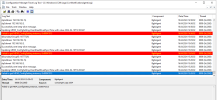
Been working for literally years, then out of the blue all of the Non sql servers did not patch. Looking in CAS.log I see:
ConfigMgr is no longer managing WindowsDO GPO. Set to default values. Mode = LAN. GroupID = empty ContentAccess 2/28/2024 1:30:06 AM 3852 (0x0F0C)
LS Request CorrelationID {54C3202F-DF2A-42F6-AB76-4CBFE076DE2B} - The number of discovered DPs(including Branch DP and Multicast) is 0 ContentAccess 2/28/2024 1:30:06 AM 3852 (0x0F0C)
There were no subnet or IP changes made.
In CCMEval.log getting
Failed to get MDM_ConfigSetting instance, 0x80041013 CcmEval 2/27/2024 9:59:17 PM 3208 (0x0C88)

All of these log entries point to boundary issues. But looking at the boundaries and boundary groups all is correct. The boundary group still contains the subnet these servers are on, and actually the same subnet as the sql boxes none of which had a issue.
I guess my question is how do I reset the boundary for a client? I don't want to mess with the boundaries or B groups themselves as they are correct clearly from the SQL boxes not having a issue. I just want a method to somehow reset these clients. Do a ccmrepair on all of them? or reinstall of client? some easier way?
 
I performed a Ccmrepair on one of the servers in this collection. made no difference. Same errors in Cas log and ccmeval
 
I have broken up my devices into SQL and Non sql servers. Other than what Microsoft patches they receive they are identical as far as boundary group and DP that they use.
Been working for literally years, then out of the blue all of the Non sql servers did not patch. Looking in CAS.log I see:
ConfigMgr is no longer managing WindowsDO GPO. Set to default values. Mode = LAN. GroupID = empty ContentAccess 2/28/2024 1:30:06 AM 3852 (0x0F0C)
LS Request CorrelationID {54C3202F-DF2A-42F6-AB76-4CBFE076DE2B} - The number of discovered DPs(including Branch DP and Multicast) is 0 ContentAccess 2/28/2024 1:30:06 AM 3852 (0x0F0C)
There were no subnet or IP changes made.
In CCMEval.log getting
Failed to get MDM_ConfigSetting instance, 0x80041013 CcmEval 2/27/2024 9:59:17 PM 3208 (0x0C88)

All of these log entries point to boundary issues. But looking at the boundaries and boundary groups all is correct. The boundary group still contains the subnet these servers are on, and actually the same subnet as the sql boxes none of which had a issue.
I guess my question is how do I reset the boundary for a client? I don't want to mess with the boundaries or B groups themselves as they are correct clearly from the SQL boxes not having a issue. I just want a method to somehow reset these clients. Do a ccmrepair on all of them? or reinstall of client? some easier way?
Are you only using IP ranges for boundaries?
 
Are you only using IP ranges for boundaries?
No I use both IP ranges and Active Directory site for them. Just to restate, this installation has been in existence for years and updated to latest SCCM. I haven't touched any boundary settings in i bet 4 years or more. Just seems very odd one entire device collection would lose its mind.
 
I saw in another of your posts you mentioned only using IP addresses. I hesitate to change anything as half of my collection is working fine. I noticed in ccmeval on a problem server that it is finding the current MP and of course it's site code. That's on a box that gives you this error
Failed to get MDM_ConfigSetting instance, 0x80041013 CcmEval 2/27/2024 6:42:07 AM 8240 (0x2030)
I would not think it could find the MP if the boundaries weren't working correctly.
 
No I use both IP ranges and Active Directory site for them. Just to restate, this installation has been in existence for years and updated to latest SCCM. I haven't touched any boundary settings in i bet 4 years or more. Just seems very odd one entire device collection would lose its mind.
Only IP ranges will be 100% correct 100% of the time. Where as AD and IP subnets will vary with based on exactly how each is setup and how exactly everything is configurated on the client.

Boundaries has no affect on collections.
 
I saw in another of your posts you mentioned only using IP addresses. I hesitate to change anything as half of my collection is working fine. I noticed in ccmeval on a problem server that it is finding the current MP and of course it's site code. That's on a box that gives you this error
Failed to get MDM_ConfigSetting instance, 0x80041013 CcmEval 2/27/2024 6:42:07 AM 8240 (0x2030)
I would not think it could find the MP if the boundaries weren't working correctly.
Boundaries have no affect on Collections.

MPs are found by querying AD, then they get boundaries.
 
I will open a ticket with MS on this. As 3 of the 4 collections are working perfectly and finding the DP and they all belong to same subnet and therefore boundary group there is no logical reason they should fail after years of no issues. Thanks for the help.
 
Device collections losing the boundary settings is a wrong statement. Now you'll have to start with some basic steps to troubleshoot this issue. First, can you tell us if you are still using both IP ranges and Active Directory site for boundaries?
 
No I never found a solution and it continues to be a issue
Are you only using IP Ranges and not using AD site anymore? This will remove boundaries as an issue and is highly likely the problem.
 
Back
Top