Hi,
Wondering if I can get some advice on the below please..
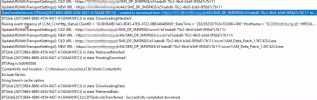
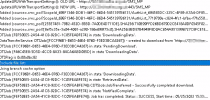
We have a site running 2111 (latest hotfix applied) that has been failing to download and install definitions to NEW client devices since upgrading to 2111, oddly pre-existing devices prior to upgrading to 2111 with the SCEP client on them are fine and can download definition updates from the package no problem, devices are on 20H2 and we have plenty of devices that existed prior to upgrading to 2111 that are still updating fine.
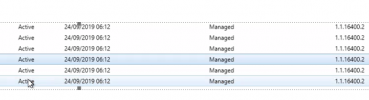
New build devices are stuck on the latest definitions of 24/09/2019 and the Endpoint Engine version remains on 1.1.1.16400.2:
We can manually download and install definitions and engine updates from Microsoft Update externally and install them but the client still isn't able to pull the updates down from SCCM after this so I don't think it's as simple as applying an earlier update unfortunately. We have alternate sources set to use Windows Update externally if it can't pull them from the source package but nothing gets cached or installed.
The client knows which updates are missing and need installing from the SUG based on the UpdatesStore.log:
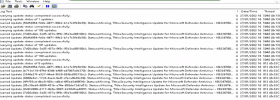
Despite this though nothing is cached and nothing gets installed.
What we have tried:
Validated all site components are healthy
Recreated ADR, Definitions Package, and SUG
Reinstall MEM client and SCEP client
Manual install of definition/engine update
Validated Boundaries and Groups
The same devices that fail to download their SCEP definitions can download WSUS updates and deploy applications from Config Manager sources fine. We can also trigger quick, full scans, and apply exclusion policies to these devices fine, they appear as 'Managed' by EP so the correct policies are applying.
One difference we noticed on new devices that fail to download SCEP updates are missing content within the C:\ProgramData\Microsoft\Windows Defender\Platform
Non-working device which fails to download definitions from configuration manager:
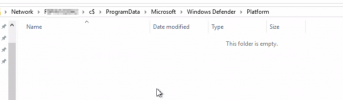
Working device with up to date definitions from configuration manager:

Any ideas or help would be most welcome.
Thanks
Wondering if I can get some advice on the below please..
We have a site running 2111 (latest hotfix applied) that has been failing to download and install definitions to NEW client devices since upgrading to 2111, oddly pre-existing devices prior to upgrading to 2111 with the SCEP client on them are fine and can download definition updates from the package no problem, devices are on 20H2 and we have plenty of devices that existed prior to upgrading to 2111 that are still updating fine.
New build devices are stuck on the latest definitions of 24/09/2019 and the Endpoint Engine version remains on 1.1.1.16400.2:
We can manually download and install definitions and engine updates from Microsoft Update externally and install them but the client still isn't able to pull the updates down from SCCM after this so I don't think it's as simple as applying an earlier update unfortunately. We have alternate sources set to use Windows Update externally if it can't pull them from the source package but nothing gets cached or installed.
The client knows which updates are missing and need installing from the SUG based on the UpdatesStore.log:
Despite this though nothing is cached and nothing gets installed.
What we have tried:
Validated all site components are healthy
Recreated ADR, Definitions Package, and SUG
Reinstall MEM client and SCEP client
Manual install of definition/engine update
Validated Boundaries and Groups
The same devices that fail to download their SCEP definitions can download WSUS updates and deploy applications from Config Manager sources fine. We can also trigger quick, full scans, and apply exclusion policies to these devices fine, they appear as 'Managed' by EP so the correct policies are applying.
One difference we noticed on new devices that fail to download SCEP updates are missing content within the C:\ProgramData\Microsoft\Windows Defender\Platform
Non-working device which fails to download definitions from configuration manager:
Working device with up to date definitions from configuration manager:
Any ideas or help would be most welcome.
Thanks