Forums on Intune, SCCM, and Windows 11

Welcome to the forums. Register a free account today to become a member! Once signed in, you'll be able to participate on this site by adding your topics and posts, as well as connect with other members through your own private inbox!

SOLVED Email Application approval requests

  • Thread starter Thread starter gerem
  • Start date Start date
  • Replies Replies 11
  • Views Views 8K
Status
Not open for further replies.

gerem

Member
Messages
6
Reaction score
1
Points
3
Hi community !

I've just updated my ConfigMgr infra to 1810 version.
And I would like to use the mail-based notification for user app approval requests.

The link is the following:
"https://siteserver.fqdn/AdminService/v1.0/UserApplicationRequest/AdminService.ApproveRequest(Guid=';<requestGUID>')"

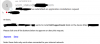
I can't access from a device connected to the corp network, I encounter the following error:
Can't connect securely to this page
This might be because the site uses outdated or unsafe TLS security settings

I haven't CMG, internal approvals are sufficient for me.

Do you know how to configure my infra to make working this great feature ?

Thanks in advance
 
Hi community !

I've just updated my ConfigMgr infra to 1810 version.
And I would like to use the mail-based notification for user app approval requests.

The link is the following:
"https://siteserver.fqdn/AdminService/v1.0/UserApplicationRequest/AdminService.ApproveRequest(Guid=';<requestGUID>')"

I can't access from a device connected to the corp network, I encounter the following error:


I haven't CMG, internal approvals are sufficient for me.

Do you know how to configure my infra to make working this great feature ?

Thanks in advance
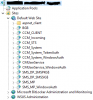
Regarding that TLS error, i guess you are accessing the URL on IE. Try accessing the URL using chrome and ensure you have specified a valid certificate under default website > edit bindings > https.
 
Regarding that TLS error, i guess you are accessing the URL on IE. Try accessing the URL using chrome and ensure you have specified a valid certificate under default website > edit bindings > https.

Thanks for your reply and your post.
The thing is, I've no 'AdminService' website on my MP.

How can I build it ? Does it correspond to another feature ?
 
SMS Provider is installed on my MP ('Allow Configuration Manager cloud management gateway traffic for administration service' unchecked).
Do I need any other configuration to implement AdminService ?

Thanks in advance
 
Can you post a screenshot of Default website and options within it ?. Also send us screenshot of what you see when you Approve the request.
 
I don't see any issues in the first screenshot. Have you configured a valid certificate under IIS bindings ?.
 
Status
Not open for further replies.

Forum statistics

Threads
7,165
Messages
27,965
Members
18,266
Latest member
josed

Trending content

Back
Top