Forums on Intune, SCCM, and Windows 11

Welcome to the forums. Register a free account today to become a member! Once signed in, you'll be able to participate on this site by adding your topics and posts, as well as connect with other members through your own private inbox!

SOLVED DSC module in SCCM

  • Thread starter Thread starter awachens
  • Start date Start date
  • Replies Replies 13
  • Views Views 3K

awachens

Well-Known Member
Messages
65
Solutions
6
Reaction score
1
Points
8
Hi all!!
I have a client talking to me about DSC module (native) in SCCM. I never saw this or listen talk about.. Can someone tell me something about this?
Have SCCM a native module for DSC? What is this? Where?
At the moment as i know DSC is a language to deploy config of OS why we need this if we have SCCM?

TIA!
 
Morning!,
Thank you very much Garth for clarifying this. I thought about the baseline to get the job done. But can you answer a question for me?

We need a script to identify devices without the correct DNS and then another to remedy this configuration, correct?

Thanks a lot!
 
Morning!,
Thank you very much Garth for clarifying this. I thought about the baseline to get the job done. But can you answer a question for me?

We need a script to identify devices without the correct DNS and then another to remedy this configuration, correct?

Thanks a lot!
Yes you can do that within a CI/Baseline. I would suggest using PowerShell to do this.
 
Yes you can do that within a CI/Baseline. I would suggest using PowerShell to do this.
Morning!
I think the same. If i should do this with a CI, can we do this withoud powershell? Have some item to this task?
I only occurs from regedit key, maybe?

Regards and thanks!
 
Morning!
I think the same. If i should do this with a CI, can we do this withoud powershell? Have some item to this task?
I only occurs from regedit key, maybe?

Regards and thanks!
can you do this without PowerShell, likely but it will likely be more difficult.
 
Morning,
No, I don't tried. Just want to know how I can do it without powershell just for knowledge.
Thanks Garth!!
If you are looking for knowledge then trying it is the best way to understand it. Because what is someone's reply is wrong but trying it will show that it works or not.
 
If you are looking for knowledge then trying it is the best way to understand it. Because what is someone's reply is wrong but trying it will show that it works or not.
Yes yes yes!! Totally true, just asking how someone can change the DNS without using PowerShell? I’m googling and I only found how to change with script or registry but … If we have more than one adapter I can’t do it from registry key. Just talking to learn and discuss new methods unknown for me.
It’s ok… I can do it with PowerShell but wanna know if someone have other methods or ideas.
Thank you for all !!
 
Morning! In advance, thanks for the answer.
I don't want really automate this (or not with Powershell I just want to know how to use CI to do this task. Just to learn, curiosity.
I know how to do with Powershell but I don't want to do with it.
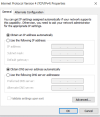
How can I do this manually?
In Network & Internet - Change adapter options - Select correct adapter - RIght click - Properties - IPV4 - Properties:
1683621322177.png
Change the DNS for another one.

For example.

Regards and TIA!!
 
Back
Top