SzosszeNET
New Member
- Messages
- 1
- Reaction score
- 0
- Points
- 1
Hi there,
Have to start as apologies, total noob to SCCM, but inherited a rough running server that I'm trying to stabilize. There are a number of issues with it, one to begin with is that the server is 1TB and can't tidy up due to some pending (error state) deployments - not to mention it does not patch servers either. One of the things I found that one of the deployment packages fail and with some digging on the distmgr.log I have found the following error:
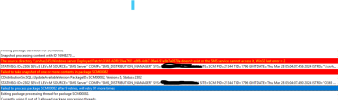
~The source directory \\sprosccm01\SOURCES\SOFTWAREUPDATES\SERVER\b34228db-40f6-4620-a72d-e9ed59ca659c doesn't exist or the SMS service cannot access it, Win32 last error = 2 $$<SMS_DISTRIBUTION_MANAGER><02-24-2020 16:56:59.773+00><thread=16512 (0x4080)>
STATMSG: ID=2306 SEV=E LEV=M SOURCE="SMS Server" COMP="SMS_DISTRIBUTION_MANAGER" SYS=SPROSCCM01SITE=002 PID=12300 TID=16512 GMTDATE=Mon Feb 24 16:56:59.775 2020 ISTR0="\\sprosccm01\SOURCES\SOFTWAREUPDATES\SERVER\b34228db-40f6-4620-a72d-e9ed59ca659c" ISTR1="00200045" ISTR2="30" ISTR3="98" ISTR4="" ISTR5="" ISTR6="" ISTR7="" ISTR8="" ISTR9="" NUMATTRS=1 AID0=400 AVAL0="00200045" $$<SMS_DISTRIBUTION_MANAGER><02-24-2020 16:56:59.779+00><thread=16512 (0x4080)>
~Failed to take snapshot of one or more contents in package 00200045 $$<SMS_DISTRIBUTION_MANAGER><02-24-2020 16:56:59.784+00><thread=16512 (0x4080)>
have checked and indeed \\sprosccm01\SOURCES\SOFTWAREUPDATES\SERVER\b34228db-40f6-4620-a72d-e9ed59ca659c does not exist to not entirely sure where to go from here - can someone point me to the right direction?
Have to start as apologies, total noob to SCCM, but inherited a rough running server that I'm trying to stabilize. There are a number of issues with it, one to begin with is that the server is 1TB and can't tidy up due to some pending (error state) deployments - not to mention it does not patch servers either. One of the things I found that one of the deployment packages fail and with some digging on the distmgr.log I have found the following error:
~The source directory \\sprosccm01\SOURCES\SOFTWAREUPDATES\SERVER\b34228db-40f6-4620-a72d-e9ed59ca659c doesn't exist or the SMS service cannot access it, Win32 last error = 2 $$<SMS_DISTRIBUTION_MANAGER><02-24-2020 16:56:59.773+00><thread=16512 (0x4080)>
STATMSG: ID=2306 SEV=E LEV=M SOURCE="SMS Server" COMP="SMS_DISTRIBUTION_MANAGER" SYS=SPROSCCM01SITE=002 PID=12300 TID=16512 GMTDATE=Mon Feb 24 16:56:59.775 2020 ISTR0="\\sprosccm01\SOURCES\SOFTWAREUPDATES\SERVER\b34228db-40f6-4620-a72d-e9ed59ca659c" ISTR1="00200045" ISTR2="30" ISTR3="98" ISTR4="" ISTR5="" ISTR6="" ISTR7="" ISTR8="" ISTR9="" NUMATTRS=1 AID0=400 AVAL0="00200045" $$<SMS_DISTRIBUTION_MANAGER><02-24-2020 16:56:59.779+00><thread=16512 (0x4080)>
~Failed to take snapshot of one or more contents in package 00200045 $$<SMS_DISTRIBUTION_MANAGER><02-24-2020 16:56:59.784+00><thread=16512 (0x4080)>
have checked and indeed \\sprosccm01\SOURCES\SOFTWAREUPDATES\SERVER\b34228db-40f6-4620-a72d-e9ed59ca659c does not exist to not entirely sure where to go from here - can someone point me to the right direction?