Forums on Intune, SCCM, and Windows 11

Welcome to the forums. Register a free account today to become a member! Once signed in, you'll be able to participate on this site by adding your topics and posts, as well as connect with other members through your own private inbox!

SOLVED Depreciate Windows 7 Support

Status
Not open for further replies.

matteobarreo

Member
Messages
21
Reaction score
2
Points
3
Good morning,

I currently only have 2 Windows 7 computers left in my environment, and they both belong to IT people, for different legacy reasons. I would like to stop supporting their computers in SCCM - I don't want them to be auto-discovered anymore, and I want to remove Windows 7 updates. Basically, I just want to free up space and stop having my console cluttered up by anything Windows 7. Is there any documentation on how to properly do this?
 
Hi matteobarreo,

Windows 7 is no longer supported since January 2020.

You can disable those two Win7 computers in Active Directory and move them to a specific Organisation Unit, then in the Active Directory System Discovery, you exclude the discovery of this OU. Once done, remove those machines from the console and the ConfigMgr will no longer discover them again.
To disable the synchronization of Windows 7 patches, go to Administration > Site Configuration > Sites, right click to your site > Configure Site Components > Software Update Point, in the Products tab, uncheck Windows 7 and click OK.

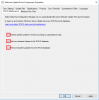
To cleanup your Software Updates database, still in the Software Update Point settings, go to WSUS Maintenance, select the 3 options. In the next Software Update Full synchronization, the WSUS cleanup job will be executed automatically.

wsuswin7.png
 
Awesome Yussef, that's exactly what I needed. We have already discontinued support, but I had two people in IT who needed their Windows 7 computers for whatever reason. Since they are in IT, I am just going to let them handle their own updates and get them out of the console so that I can start purging out Windows 7 updates and other things taking up extra space.

Thanks again for your quick reply!
 
Status
Not open for further replies.

Forum statistics

Threads
7,182
Messages
28,015
Members
18,317
Latest member
rbushart

Trending content

Back
Top