Forums on Intune, SCCM, and Windows 11

Welcome to the forums. Register a free account today to become a member! Once signed in, you'll be able to participate on this site by adding your topics and posts, as well as connect with other members through your own private inbox!

PENDING Deployment deadlines - user delay

  • Thread starter Thread starter pcb
  • Start date Start date
  • Replies Replies 12
  • Views Views 5K

pcb

Well-Known Member
Messages
45
Solutions
2
Reaction score
0
Points
6
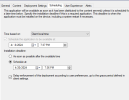
Has anyone gotten deployment deadlines to work? If I set a deployment to be required and an install deadline that is later than today and I check the box show a dialog to the user instead of a toast notification, Sometimes (rarely) I get the dialog and it has the option to delay the install like "1 hour" or "Later" - it is inconsistent. Most of the time, it just installs the software with a toast notification and I never see the dialog. If the dialog does show up, I get a toast notification a few seconds later that it is downloading and installing software. Whether I select to delay or not (in the rarely displayed dialog), the software installs immediately. I don't get it.

Scheduling a required install:
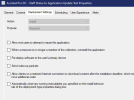
1712607685168.png
1712607745869.png

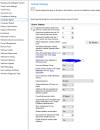
These settings don't appear to have any effect no matter how I set them:
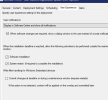
1712608593604.png
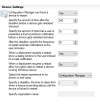
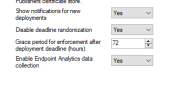
Computer Agent settings:
1712608763595.png
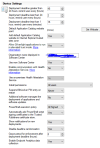
Restart settings
1712607507879.png
 

Attachments

  • 1712606888857.png
    1712606888857.png
    47.6 KB · Views: 5
I've been messing with this for hours... it is completely borked. Does whatever it feels like at the moment which is rarely what you want.
 
It is unclear to me is the problem the deployment or the notification? Have you reviewed the logs?
 
It is the notification dialog. MECM seems to do toast notifications consistantly, but if you choose the dialog option, the notifications are inconsistent. Sometimes they show, but most of the time, not. I gave up. I set it pretty much every way possible and it did what I wanted about 3 or 4 times... each time when I tried to repeat it the notification didn't show. I finally decided that it was more important to deploy the update then warn people about it or give them the option to delay. I left the settings in place, so maybe some of them are getting the notice, but I think it probably isn't notifying anyone.
 
It is the notification dialog. MECM seems to do toast notifications consistantly, but if you choose the dialog option, the notifications are inconsistent. Sometimes they show, but most of the time, not. I gave up. I set it pretty much every way possible and it did what I wanted about 3 or 4 times... each time when I tried to repeat it the notification didn't show. I finally decided that it was more important to deploy the update then warn people about it or give them the option to delay. I left the settings in place, so maybe some of them are getting the notice, but I think it probably isn't notifying anyone.
And what do the logs say is happening?
 
Last edited:
Well... there is no appenforce log and in location services log I am seeing "there are no certificates to install" -- is this a boundary issue?
 
Well... there is no appenforce log and in location services log I am seeing "there are no certificates to install" -- is this a boundary issue?
The logs will show if it is a boundary issue. However, are you only using IP ranges for boundaries?
 
The logs will show if it is a boundary issue. However, are you only using IP ranges for boundaries?
No... I have tried repeatedly to convince our admins to make that change, but we are using a mix of subnets, ranges, AutoOn for VPN and AD site.
 
No... I have tried repeatedly to convince our admins to make that change, but we are using a mix of subnets, ranges, AutoOn for VPN and AD site.
Then, read the log and show them that the device is not within the boundary and have them fix it.
 
Then, read the log and show them that the device is not within the boundary and have them fix it.
Can you tell me which log? I have never seen anything in the client logs that mentions boundaries... only indications like an app can't be found, or certificates can't be loaded, etc. Searching the log directory for boundary or boundaries produced no results.
 
Can you tell me which log? I have never seen anything in the client logs that mentions boundaries... only indications like an app can't be found, or certificates can't be loaded, etc. Searching the log directory for boundary or boundaries produced no results.
Then, read the log and show them that the device is not within the boundary and have them fix it.
Never mind... I found it in location services. It does have a boundary group id, so I'm lost again. Maybe this feature just doesn't work the way it is documented.
 
ok, I am convinced that this feature just doesn't work. I just ran a test where I deployed for uninstall of an app with the deployment set like this:
1712772774496.png

client settings like this:
1712772915378.png

I get a taskbar icon in the taskbar near the clock that looks like the one when a notification DIALOG is shown, but the dialog doesn't show... a few seconds later it changes to the standard icon and a toast notification appears saying software is being removed.

After it runs, I now have an app enforce log and a restart notice:


I have tried setting a date several days in the future for uninstall and a reminder of every 16 hours when greater than 24 (in client settings), but no reminder is shown and in software center, the app says it will be removed after the date I set. When the date is reached, no dialog is displayed with an offer to delay and the same behavior occurs - I get the icon that looks like a notification is being given, but no dialog appears and then it changes to the icon and I get a toast notification that the software is being removed. This is a big application and it takes 20 minutes or more to uninstall - I'd really like to let people know before the uninstall starts and give them the option to delay, but I guess that just isn't possible. Unless someone knows a trick or has figured out where I am being blind... we can forget this one.
 
Back
Top