Forums on Intune, SCCM, and Windows 11

Welcome to the forums. Register a free account today to become a member! Once signed in, you'll be able to participate on this site by adding your topics and posts, as well as connect with other members through your own private inbox!

PENDING Dell E7450 Unable to boot using SCCM

Messages
5
Reaction score
0
Points
1
I am stuck with deploying widows using PXE to Dell E7450, it wont pick driver for NIC card and I am unable to proceed further. It would be great help if you can help me with that by posting some blog how to deploy Windows on E7450 using SCCM .I used latest driver package to create boot image.
Please help
 
Have you added the drivers to the boot image ?. If yes have you distributed the boot image to the DP ?. When you say it won't pick the network driver then you need to check whether you have added the correct driver. Are you using Dell utility to import the drivers ?.
 
Yes i did added all drivers under boot image. So my main concern is making it work using pxe , i tried creating new image specially for e7450 with supported drivers still no luck to do PXE boot under SCCM.
 
Which drivers have you imported into the Boot Image?

The Dell WinPE 10.0 CAB should be all you need - normally, however the 72xx/74xx series seem to work a lot better if you use the updated drivers out of the latest Intel ProSet driver package. I think there's about 4 NIC drivers. Specifically, the 72xx/74xx needs I217-LM. I recommend removing all Intel NIC drivers added by the Dell WinPE, and replace them with the latest Intel ProSet.

It's also worth noting that to get a successful Windows 7 deployment on the 72xx/74xx range you will definitely require KMDF and UMDF frameworks to be part of your .wim. You can ignore this if you're not deploying Windows 7 :)
 
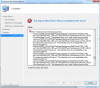
Hi, I am facing the same issue for Dell E7450. I hacve downloaded the recent .cab file from dell site. While importing i am getting the below msg.

upload_2015-10-27_12-12-38.png
 
I recommend using the Dell Command Import tool for importing the drivers..... don't forget to launch ConfigMgr as Admin.


D52lXQv.png


jygP0An.png
 
Did you launch ConfigMgr as Admin ?. The user account that you are using is a part of which security role ?.
 
I am using as admin only..and its a part of full administration role.. There is definitely a problem with Dell drivers for E7450.. Please help on this.
 
The error in the screenshot clearly says it's not a valid windows device driver or the selected driver is not applicable to any supported platforms. My suggestion would be to download the driver file again and import it.
 
Are you importing the full 7450 .cab file?

Which is downloaded from; http://en.community.dell.com/techce...7938.latitude-e74507450-windows-7-driver-pack


Of course, if you're NOT using Dell Command tools to import, you will need to extract the .cab manually, and then import.


Also, when researching some of the .inf's that are failing in your error shot. It seems common, the blurb below is taken from the Broadcom site.
  • When you import Broadcom Blue Tooth driver,you may get a warning "btwampfl_svc.inf is not a valid Windows device driver".Please ignore this warning, it doesn't have any effect on the driver.
 
yes i have downloaded from the same link and extracted all the drivers and then try to import. I have tried both the methods of using Dell command tool and manually importing. Both gives the same error. I though of ignoring the warning but my PXE is not booting up because of the NIC driver issues. I am stuck at this point and cannot do anything..
 
Really, you ONLY need the Dell WinPE10 NIC & Storage drivers in the Boot Image, normally anyway. However, for the newer Dell models, it is recommended you use the drivers found in the PRO1000 folder (PRO1000\Winx64) from the latest Intel ProSet Driver set.

Booting a 7450 uses the Intel(R) Ethernet Connection (3) I218-LM driver.

As an example, our Boot Image contains the following drivers ONLY.

7TTAa0i.png

vFn6Ue9.png

vFn6Ue9.png
 
Vini would be correct on this. You cannot load all of your drivers into the boot image, it is just going to become corrupt at some point and it's going to take forever to distribute content to the DP. We started rolling out E7450's not too long ago so I know it works through SCCM, you just need the insert the correct driver into the boot image. I'm still newer to SCCM but I believe your driver has to match that of which ever version of WinPE you are running off of your boot image. On my boot image I am using WinPE 5.1 (Win 8.1) so I inserted the 8.1 drivers into the boot image to make mine work. Correct me if I'm wrong on this please.
 
I am stuck with deploying widows using PXE to Dell E7450, it wont pick driver for NIC card and I am unable to proceed further. It would be great help if you can help me with that by posting some blog how to deploy Windows on E7450 using SCCM .I used latest driver package to create boot image.
Please help
Did you add the driver manually to the bootimage or use the console? if you did it manually you will have to remove the driver manually again, as this one will not be visible in the console.You should do this kind of operation from the console, then anyone will see what's in the bootimage. You can refer to Dell Latitude E7450 Manual for details and help.
 
Back
Top