

surfrock66
Member
- Messages
- 23
- Solutions
- 2
- Reaction score
- 0
- Points
- 1
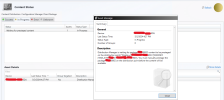
I'm having a problem which seems to have a lot of of posts about it. We're on Microsoft Config Manager 5.00.9122.1018, on Windows Server 2019. When working on OSD Task Sequences, we learned the content for our Client Package was not available. Upon investigating, we see this:
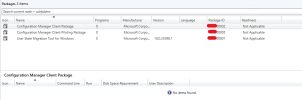
The package itself does not show any programs, which I think is normal:
I have done extensive research so far, but nothing has helped. The Distribution Point is configured for prestaged content. Other packages distribute just fine. I've done several rounds of redistributing, validating, rebooting, etc to no effect. Below is the relevant distmgr.log entries (redacted)
One thing I am noticing, from other systems, I cannot load the \\SERVERNAME.DOMAIN.TLD\SMS_CODE\Client share, even as a domain admin or the client-push account. It just times out. We did not modify these settings from the default install when the failures first occurred, and I can see the share for it (C:\Program Files\Microsoft Configuration Manager) in server manager's list of shares. That being said, I tried to grant access to the folder and the share and didn't get a different result; I also directly modified the permissions of the "Client" folder to no effect either. Is this share somehow treated differently in a way I don't understand?
My next steps would be to copy the contents of "C:\Program Files\Microsoft Configuration Manager\Client" and create a brand new client install package from scratch, but I'm looking for guidance if there's a better solution first.
Most of my thinking of how to save this is the concept of "prestaging the content first" but I don't see how to do this? This is our site server and only DP (at this time, rolling out this as a new environment) and even though I can export the content, I don't see a way to prestage it; most options for modifying distribution of this package are grayed out even though I launched as admin on the site server itself:
Distribution Manager is waiting for package SITECODE00002 content to be prestaged on the distribution point ["Display=\\SERVERNAME.DOMAIN.TLD\"]MSWNET:["SMS_SITE=SITECODE"]\\SERVERNAME.DOMAIN.TLD\. You must manually prestage the package SITECODE00002 on the distribution point before the content will be available.
The package itself does not show any programs, which I think is normal:
I have done extensive research so far, but nothing has helped. The Distribution Point is configured for prestaged content. Other packages distribute just fine. I've done several rounds of redistributing, validating, rebooting, etc to no effect. Below is the relevant distmgr.log entries (redacted)
Adding package 'SITECODE00002' to package processing queue. $$<SMS_DISTRIBUTION_MANAGER><05-03-2024 10:50:30.244+420><thread=11064 (0x2B38)>
~Currently using 0 out of 3 allowed package processing threads. $$<SMS_DISTRIBUTION_MANAGER><05-03-2024 10:50:30.271+420><thread=11064 (0x2B38)>
~Started package processing thread for package 'SITECODE00002', thread ID = 0x1374 (4980) $$<SMS_DISTRIBUTION_MANAGER><05-03-2024 10:50:30.772+420><thread=11064 (0x2B38)>
~Sleep 3600 seconds... $$<SMS_DISTRIBUTION_MANAGER><05-03-2024 10:50:30.774+420><thread=11064 (0x2B38)>
STATMSG: ID=2300 SEV=I LEV=M SOURCE="SMS Server" COMP="SMS_DISTRIBUTION_MANAGER" SYS=SERVERNAME.DOMAIN.TLD SITE=SITECODE PID=4864 TID=4980 GMTDATE=Fri May 03 17:50:30.777 2024 ISTR0="Configuration Manager Client Package" ISTR1="SITECODE00002" ISTR2="" ISTR3="" ISTR4="" ISTR5="" ISTR6="" ISTR7="" ISTR8="" ISTR9="" NUMATTRS=1 LE=0X0 AID0=400 AVAL0="SITECODE00002" $$<SMS_DISTRIBUTION_MANAGER><05-03-2024 10:50:30.777+420><thread=4980 (0x1374)>
~Processing package SITECODE00002 (SourceVersion:7;StoredVersion:7) $$<SMS_DISTRIBUTION_MANAGER><05-03-2024 10:50:30.780+420><thread=4980 (0x1374)>
No action specified for the package SITECODE00002, however there may be package server changes for this package. $$<SMS_DISTRIBUTION_MANAGER><05-03-2024 10:50:30.781+420><thread=4980 (0x1374)>
Start updating package SITECODE00002 on server ["Display=\\SERVERNAME.DOMAIN.TLD\"]MSWNET:["SMS_SITE=SITECODE"]\\SERVERNAME.DOMAIN.TLD\... $$<SMS_DISTRIBUTION_MANAGER><05-03-2024 10:50:30.788+420><thread=4980 (0x1374)>
DP ["Display=\\SERVERNAME.DOMAIN.TLD\"]MSWNET:["SMS_SITE=SITECODE"]\\SERVERNAME.DOMAIN.TLD\ and package are marked for prestaging, therefore the package will not be automatically copied to the distribution point. Please prestage the package on the DP. $$<SMS_DISTRIBUTION_MANAGER><05-03-2024 10:50:30.792+420><thread=4980 (0x1374)>
STATMSG: ID=2371 SEV=I LEV=M SOURCE="SMS Server" COMP="SMS_DISTRIBUTION_MANAGER" SYS=SERVERNAME.DOMAIN.TLD SITE=SITECODE PID=4864 TID=4980 GMTDATE=Fri May 03 17:50:30.794 2024 ISTR0="SITECODE00002" ISTR1="["Display=\\SERVERNAME.DOMAIN.TLD\"]MSWNET:["SMS_SITE=SITECODE"]\\SERVERNAME.DOMAIN.TLD\" ISTR2="" ISTR3="" ISTR4="" ISTR5="" ISTR6="" ISTR7="" ISTR8="" ISTR9="" NUMATTRS=2 LE=0X0 AID0=400 AVAL0="SITECODE00002" AID1=404 AVAL1="["Display=\\SERVERNAME.DOMAIN.TLD\"]MSWNET:["SMS_SITE=SITECODE"]\\SERVERNAME.DOMAIN.TLD\" $$<SMS_DISTRIBUTION_MANAGER><05-03-2024 10:50:30.793+420><thread=4980 (0x1374)>
GetDPUsableDrives - ["Display=\\SERVERNAME.DOMAIN.TLD\"]MSWNET:["SMS_SITE=SITECODE"]\\SERVERNAME.DOMAIN.TLD\ $$<SMS_DISTRIBUTION_MANAGER><05-03-2024 10:50:30.823+420><thread=4980 (0x1374)>
Finished GetDPUsableDrives - ["Display=\\SERVERNAME.DOMAIN.TLD\"]MSWNET:["SMS_SITE=SITECODE"]\\SERVERNAME.DOMAIN.TLD\ $$<SMS_DISTRIBUTION_MANAGER><05-03-2024 10:50:30.828+420><thread=4980 (0x1374)>
~CreateSignatureShare, connecting to DP $$<SMS_DISTRIBUTION_MANAGER><05-03-2024 10:50:30.830+420><thread=4980 (0x1374)>
~Signature share exists on distribution point path \\SERVERNAME.DOMAIN.TLD\SMSSIG$ $$<SMS_DISTRIBUTION_MANAGER><05-03-2024 10:50:30.832+420><thread=4980 (0x1374)>
GetDPUsableDrives - ["Display=\\SERVERNAME.DOMAIN.TLD\"]MSWNET:["SMS_SITE=SITECODE"]\\SERVERNAME.DOMAIN.TLD\ $$<SMS_DISTRIBUTION_MANAGER><05-03-2024 10:50:30.833+420><thread=4980 (0x1374)>
Finished GetDPUsableDrives - ["Display=\\SERVERNAME.DOMAIN.TLD\"]MSWNET:["SMS_SITE=SITECODE"]\\SERVERNAME.DOMAIN.TLD\ $$<SMS_DISTRIBUTION_MANAGER><05-03-2024 10:50:30.837+420><thread=4980 (0x1374)>
~Share SMSPKGD$ exists on distribution point \\SERVERNAME.DOMAIN.TLD\SMSPKGD$ $$<SMS_DISTRIBUTION_MANAGER><05-03-2024 10:50:30.840+420><thread=4980 (0x1374)>
~All DP threads have completed for package SITECODE00002 processing thread. $$<SMS_DISTRIBUTION_MANAGER><05-03-2024 10:50:30.902+420><thread=4980 (0x1374)>
~Package SITECODE00002 does not have a preferred sender. $$<SMS_DISTRIBUTION_MANAGER><05-03-2024 10:50:31.410+420><thread=4980 (0x1374)>
The package and/or program properties for package SITECODE00002 have not changed, need to determine which site(s) need updated package info. $$<SMS_DISTRIBUTION_MANAGER><05-03-2024 10:50:31.411+420><thread=4980 (0x1374)>
~CDistributionSrcSQL::UpdateAvailableVersion PackageID=SITECODE00002, Version=7, Status=2301 $$<SMS_DISTRIBUTION_MANAGER><05-03-2024 10:50:31.412+420><thread=4980 (0x1374)>
~StoredPkgVersion (7) of package SITECODE00002. StoredPkgVersion in database is 7. $$<SMS_DISTRIBUTION_MANAGER><05-03-2024 10:50:31.421+420><thread=4980 (0x1374)>
~SourceVersion (7) of package SITECODE00002. SourceVersion in database is 7. $$<SMS_DISTRIBUTION_MANAGER><05-03-2024 10:50:31.422+420><thread=4980 (0x1374)>
STATMSG: ID=2301 SEV=I LEV=M SOURCE="SMS Server" COMP="SMS_DISTRIBUTION_MANAGER" SYS=SERVERNAME.DOMAIN.TLD SITE=SITECODE PID=4864 TID=4980 GMTDATE=Fri May 03 17:50:31.431 2024 ISTR0="Configuration Manager Client Package" ISTR1="SITECODE00002" ISTR2="" ISTR3="" ISTR4="" ISTR5="" ISTR6="" ISTR7="" ISTR8="" ISTR9="" NUMATTRS=1 LE=0X0 AID0=400 AVAL0="SITECODE00002" $$<SMS_DISTRIBUTION_MANAGER><05-03-2024 10:50:31.431+420><thread=4980 (0x1374)>
~Exiting package processing thread for package SITECODE00002. $$<SMS_DISTRIBUTION_MANAGER><05-03-2024 10:50:31.435+420><thread=4980 (0x1374)>
CDistributionManager::CleanupDPRegistry process starts $$<SMS_DISTRIBUTION_MANAGER><05-03-2024 10:50:35.250+420><thread=12564 (0x3114)>
CDistributionManager::CleanupDPRegistry process completed $$<SMS_DISTRIBUTION_MANAGER><05-03-2024 10:50:35.251+420><thread=12564 (0x3114)>
CDistributionManager::CleanupMDMContent process started $$<SMS_DISTRIBUTION_MANAGER><05-03-2024 10:50:35.252+420><thread=12564 (0x3114)>
CDistributionManager::CleanupMDMContent process completed $$<SMS_DISTRIBUTION_MANAGER><05-03-2024 10:50:35.253+420><thread=12564 (0x3114)>
CDistributionManager::CleanDistributionPoints process completed. $$<SMS_DISTRIBUTION_MANAGER><05-03-2024 10:50:35.256+420><thread=12564 (0x3114)>
~Currently using 0 out of 3 allowed package processing threads. $$<SMS_DISTRIBUTION_MANAGER><05-03-2024 10:50:35.787+420><thread=11064 (0x2B38)>
~Sleep 3600 seconds... $$<SMS_DISTRIBUTION_MANAGER><05-03-2024 10:50:35.789+420><thread=11064 (0x2B38)>
~Currently using 0 out of 3 allowed package processing threads. $$<SMS_DISTRIBUTION_MANAGER><05-03-2024 10:50:40.801+420><thread=11064 (0x2B38)>
~Sleep 3600 seconds... $$<SMS_DISTRIBUTION_MANAGER><05-03-2024 10:50:40.803+420><thread=11064 (0x2B38)>
One thing I am noticing, from other systems, I cannot load the \\SERVERNAME.DOMAIN.TLD\SMS_CODE\Client share, even as a domain admin or the client-push account. It just times out. We did not modify these settings from the default install when the failures first occurred, and I can see the share for it (C:\Program Files\Microsoft Configuration Manager) in server manager's list of shares. That being said, I tried to grant access to the folder and the share and didn't get a different result; I also directly modified the permissions of the "Client" folder to no effect either. Is this share somehow treated differently in a way I don't understand?
My next steps would be to copy the contents of "C:\Program Files\Microsoft Configuration Manager\Client" and create a brand new client install package from scratch, but I'm looking for guidance if there's a better solution first.
Most of my thinking of how to save this is the concept of "prestaging the content first" but I don't see how to do this? This is our site server and only DP (at this time, rolling out this as a new environment) and even though I can export the content, I don't see a way to prestage it; most options for modifying distribution of this package are grayed out even though I launched as admin on the site server itself:


