Forums on Intune, SCCM, and Windows 11

Welcome to the forums. Register a free account today to become a member! Once signed in, you'll be able to participate on this site by adding your topics and posts, as well as connect with other members through your own private inbox!

PENDING ConfigMgr TS Install Application Failed with 0x80004005

  • Thread starter Thread starter SpectreMill
  • Start date Start date
  • Replies Replies 7
  • Views Views 2K

SpectreMill

New Member
Messages
4
Reaction score
0
Points
1
Hi Prajwal,

Been troubleshooting this issue for days now. Appreciate if you could find an answer to this.

Thank you very much.
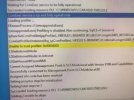
SCCM-Error.jpeg
 
Exactly what problem is this message causing? Keep in mind that just because their is a warning, doesn't mean it is causing a problem.
 
Exactly what problem is this message causing? Keep in mind that just because their is a warning, doesn't mean it is causing a problem.
Hi Garth,

Thanks for your reply, It's about my OSD Task Sequence, failing during "Task : Install Application".
It will get stuck for a while and then an error will appear with 0x80004005.
 
Disable that application and check if the TS completes. Examine the smsts.log carefully; not all "red" color highlighted items are errors.
 
Hi Prajwal, Garth,

To expand more on this error, kindly see these two screenshots.

Thank you for looking into this.
 

Attachments

  • 20231005_1248411.jpg
    20231005_1248411.jpg
    851.3 KB · Views: 9
  • 20231005_1248001.jpg
    20231005_1248001.jpg
    893.6 KB · Views: 11
Hi Garth,

Thanks for your reply, It's about my OSD Task Sequence, failing during "Task : Install Application".
It will get stuck for a while and then an error will appear with 0x80004005.
Exactly what app is failing? exactly what does its logs say is happening?
 
Exactly what app is failing? exactly what does its logs say is happening?
Hi Prajwal, Garth,

To expand more on this error, kindly see these two screenshots.

Thank you for looking into this.
Hi Garth,

I have 2 apps trying to install; Globalprotect and Google Chrome Enterprise (which are both .msi) from Application. Kindly see below screenschot.
Thank you.
 

Attachments

  • 5646-862d6ad34da6f11fd3ef95bb5951c29a.jpg
    5646-862d6ad34da6f11fd3ef95bb5951c29a.jpg
    4.1 KB · Views: 3
  • 20231005_1248001.jpg
    20231005_1248001.jpg
    893.6 KB · Views: 4
Hi Garth,

I have 2 apps trying to install; Globalprotect and Google Chrome Enterprise (which are both .msi) from Application. Kindly see below screenschot.
Thank you.
You need to read the logs you create for those app. Did you actually tell them to create logs? Those screenshoots are tiny.
 

Forum statistics

Threads
7,142
Messages
27,884
Members
18,176
Latest member
Omega
Back
Top